Friday, 11 November 2011

Performance tuning using Trace Parser (Dynamics AX 2012)

On the text below, I'll be going through some traces and analysis using Trace Parser for Dynamics AX 2012.


It will covers:
  1. RPC
  2. Database call
  3. Record caching
  4. Method call
  5. Set / row-by-row operation
  6. Queries

I've created a demo class to shows the execution duration for each of the section mentioned above, below are the method name and its duration. You can download the XPO file from here.


Each pair of the method in the screenshot below has similar code, but only with a small difference, it makes it easier for you to do a comparison of how these small changes can make the code run faster. I'll go through each of that in details in this post.


NOTE: TEC_TraceDemo class 'RunOn' property has been set to run from server.


RPC (shows using file)


Both the .testRPCServer() and .testRPCClient() has similar code, except where the file is opened.


In .testRPCServer(), the file is opened from server side (static server AsciiIo openFileServer(Filename _fileName)), then returned to parent method and do the reading line by line. For each of that reading, due to the file is opened from server, there's no RPC call involved.


In .testRPCClient(), the file is opened from client side (static client AsciiIo openFileClient(Filename _fileName)), then returned to parent method (which is running from server) and do the reading line by line. For each of that reading, due to the file is opened from client, the server process needs to make an RPC call to client to read the file.


Comparing both of the methods above with the trace parser, you can see that:
- The .testRPCServer() has 0 RPC call and takes 8.33ms
- The .testRPCClient() has 204 RPC calls and takes 56.05ms


With a small change of opening the file at server where the code is running, it reduces the RPC calls and makes it run faster.


*The code sample above is using "C" drive as the directory, that's just for testing. If the code is running from server and the path selected by user is "C" drive of their own machine, it will cause error. Consider using shared directory.


RPC (shows using Map)

Both the .testMapLessRPC() and .testMapMoreRPC() has similar code, except how the map is used. The sample code below simulate & shows the situation when a Map is instantiated at a form, then passed to server for processing.


*TEC_MapTest 'RunOn' property is set to "Client"


In .testMapLessRPC(), the map is instantiated from client side, then it pack and return the map to server, recreate it from server side. After that it loop through the server map. Each call to read from the server map does not involve RPC call due to the map is on server side.


In .testMapMoreRPC(), the map is instantiated from client side, then it return the map to server. After that it loop through the client map. Each call to read from the client map involve RPC call due to the map is on client side and the calling code is from server side.


Comparing both of the methods above with the trace parser, you can see that:
- The .testMapLessRPC() has 6 RPC call and takes 3.29ms
- The .testMapMoreRPC() has 19 RPC calls and takes 5.52ms


*Create the map at server side does incurs some overhead, at the background, it actually insert the map one by one again from the packed container. But comparing to the cost of RPC call when looping through the client map, it might be better to recreate it. But if you don't intent to loop through all the element in the map, then probably client map remains better. It it entirely up what's the functionality you're writing, you'll have to make your own judgement. The example here is just to show what's the impact and how it can make a difference.


Database call


Both the .bulkInsertTraceDemoTable_RIL() and .bulkInsertTraceDemoTable_INS() has similar code, except how they're inserted.


In .bulkInsertTraceDemoTable_RIL(), records is added into RecordInsertList class and do the insert at once at the end. This reduce the database call. Periodically if the buffer limit of the RIL is reached, it will make a database call to insert and flush the buffer. Then at the end of the method, it do the final insert (one database call).


In .bulkInsertTraceDemoTable_INS(), records is inserted each time .insert() is call. Each of this .insert() make a database call to SQL server to do the insert.


Comparing both of the methods above with the trace parser, you can see that:
- The .bulkInsertTraceDemoTable_RIL() has 19 database call and takes 556.34ms
- The .bulkInsertTraceDemoTable_INS() has 1008 database calls and takes 2,780.07ms


Another way of viewing it is by looking at the 'X++/RPC' tab.
Eg. If you have done a trace for a poor performance functionality, using this tab, you can identify which method takes most of the execution time (sort by 'Total inclusive (ms)' column) or which method runs too many times (sort by 'Count' column). This gives you an idea of which one should be picked up for performance review & analysis.


Record caching


Both the .testRecordCache_Cached() and .testRecordCache_NotCached() has similar code, except one is reading from cached record and another one is not.


TEC_TraceDemoTable has a unique index on 'Field1' and doesn't have any index for 'Field3'


In .testRecordCache_Cached(), within the loop, the first read issue a database call and cached the record. Then on subsequent read, it read from cache, no database call needed. The ::dummyStatic() does not do anything, it is just to let it appear in the Trace Parser, make it easier to sees that it doesn't make a database call.


In between the ::dummyStatic(), the select statement didn't shows up due to it read from cache, doesn't make database call.


In .testRecordCache_NotCached(), within the loop, for each select, due to the query criteria 'Field3' does not have a unique index, it needs to make a database call to SQL server to read the data.


In between the ::dummyStatic(), the select statement shows up due to it needs to make a database call to SQL server to read it.


Comparing both of the methods above with the trace parser, you can see that:
- The .testRecordCache_Cached() has 1 database call and takes 48.59ms
- The .testRecordCache_NotCached() has 101 database calls and takes 247.02ms


Method call

Both the .testMethodCallInline() and .testMethodCallInner() has similar code, except one is running the counterBuffer++ within the loop and another one is running counterBuffer++ through another method.

In .testMethodCallInline(), it execute the 'counterBuffer++' within the loop, didn't involve passing control to another method.


In .testMethodCallInner(), it calls increaseValue() within the loop, which execute the 'counterBuffer++' for each of the call. For each of the loop, it pass the control to the child method, then back to parent method when it is finished.


Best practise is to have a separate method to do a specific task, then it can be reused somewhere else (Eg. the inner method, it usually is another method, I just write it as inner method to make it easier to read). But sometimes, on a performance intensive process where milliseconds does matter, we might have to break the rule. I'm not suggesting to always do that, the example here is just to show what difference it could make.


Comparing both of the methods above with the trace parser, you can see that:
- The .testMethodCallInline() takes 238.59ms
- The .testMethodCallInner() takes 974.41ms


Set / row by row operation

Both the .testSetOperation() and .testRowByRow() has exactly the same code except the table being used is different.


The .insert(), .update(), & .delete() method for table TEC_TraceDemoRowByRowTable has been overwritten but not for table TEC_TraceDemoSetOperationTable.


In .testSetOperation(), due to the .insert(), .update(), & .delete() has not been overwritten, it make one database call to do set operation. Eg. Insert 50 records, 1 database call.


In .testRowByRow(), the method .insert(), .update(), & .delete() has been overwritten, the set operation is downgraded to row-by-row operation and make one database call for each record it operate on. Eg. Insert 50 records, 50 database calls.


It will downgrade to row-by-row operation if either of the following conditions is true:
- insert() / update() / delete() is overwritten
- Is temp table
- Has database logging setup on that table
- Alert is set on that table
- Record level security is configured for that table


Comparing both of the methods above with the trace parser, you can see that:
- The .testSetOperation() has 10 database calls and takes 60.07ms
- The .testRowByRow() has 27 database calls and takes 184.28ms


Queries


In testQuery1(), 'Field1' is the unique index for table TEC_TraceDemoTable, any query with that as criteria will make it cache the record. 'Field5' is not unique index, query result with that criteria will not be cached.


Each query in the screenshot is explained by the comment next to it.


3 database call due to only one query can make use of the cached record.


Each query in the screenshot below is explained by the comment next to it.


1 database call due to 3 queries can make use of the cached record.


In .testQuery3(), both query has the same criteria, but with different field list.
First query only select 'ItemId' and 'InventDimId'.
Second query select all fields.


First query cost 0.36ms and second query cost 1.31ms.
By reducing the field list, it reduce the execution time.
Imagine if this is a validation section of an import process which imports 1 million records, reducing the field list will save 1,000,000ms, which translates to 16.67 minutes.


In .testQuery4(), both query has the same field list, but with different criteria.
I added a non-unique index in InventTrans table for 'InvoiceId'.
There's no index for field 'PickingRouteId'.


First query has the help from the index.
Second query doesn't have the help from any index.


With the help from index, the query takes 0.54ms.
Without the help from index, it takes 26.02ms.
This post focus on Trace Parser rather than on query tuning and indexing, so I'll skip that here.


Screenshot below shows how you can make use of Trace Parser to start looking into what needs to be optimized.


The SQL tab is where you can look for problematic query easily by sorting it in descending order.
Either sort it in descending by 'Inclusive Total (ms)' or 'Exclusive Total (ms)' column.


Summary of all 4 queries method.


Related (updated on 18/06/2012):


Wednesday, 9 November 2011

London Student Fees Protest 09/11/2011 (9 November 2011)

Recorded this protest this afternoon when going out for lunch from office.
Another peaceful protest, no violence, yet.


Thursday, 27 October 2011

AX query/filter with other relative field

One of my colleague posted a question, how do we filter Dynamics AX table with value from another field.
The solution is to put the field name in the query criteria.

An example is better than explaining in words, here goes the sample.

*Remember to put the parentheses () around the query criteria else you'll get error.

This is the data before any filter

Then apply this filter

You’ll get this

So it looks like it does return the correct result

Tuesday, 25 October 2011

Form changes crashed AX client

Recently I made changes to a form and while the form compiled OK and there isn't anything wrong within the code, it keep crashing the AX client when opening it. Debugging into the crashing, it was found that the crashing happens at "sysSaveSetup.loadFormSetup();" in "\Classes\SysSetupFormRun\init".

During the development, several changes is made and throughout the testing, I open and closed the form frequently, it saved the usage data (Eg. the field setup, splitter dragged to other position, and etc). After further changes, the saved usage data does not compatible with the form anymore and everytime when it tries to load it, it crash the AX client.

Quickest solution: Delete the usage data.
  1. Path: Tools > Options > Usage data (button)
  2. Look for the record with your form name and delete it

Friday, 14 October 2011

Dynamics AX 2012 RTM demo data


Direct links

How to deploy all AX2012 report

There're 3 different ways to deploy Dynamics AX2012 reports:
  1. Through AOT
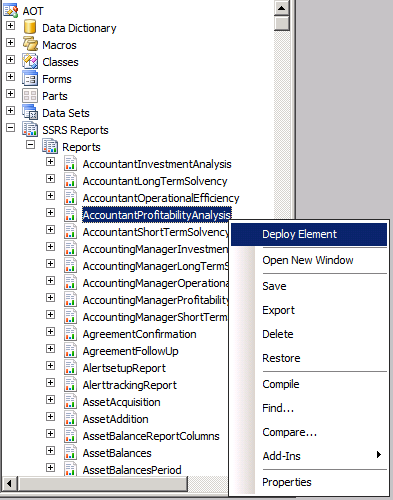
    AOT > SSRS Reports > Reports > right click on report > Deploy Element
     
  2. Through Visual Studio
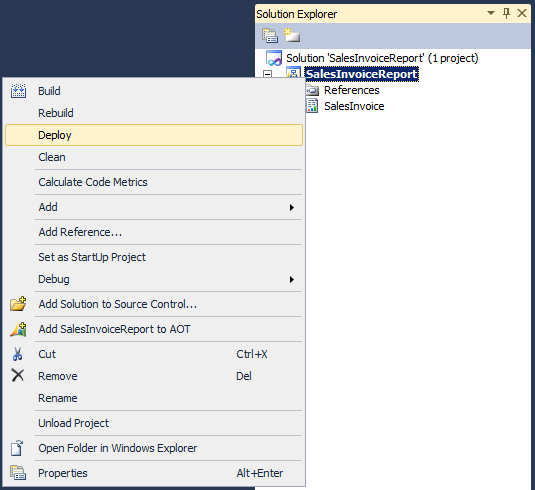
    Open the report project > Right click on the project or solution node > Deploy
     
  3. Through PowerShell
    Publish-AXReport -ReportName *


Through AOT
- Go to AOT > SSRS Reports > Reports > (right click on report) > Deploy Element
- Right click on the report node
- Click "Deploy Element"
Deploy AX2012 report through AOT

Through Visual Studio
- Open the report project
- Right click on the project or solution node
- Click "Deploy"
Deploy AX2012 report through Visual Studio


Through PowerShell
- Go to: Start > Administrative Tools > Microsoft Dynamics AX 2012 Management Shell
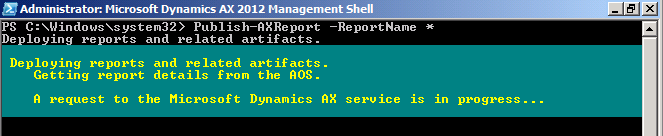
- Then enter Publish-AXReport -ReportName *

This will deploy all AX2012 reports into report server, you might want to do this after the initial installation as the report server doesn't have all the report there yet. It takes about 20 minutes for me to deploy all the reports (that's on my Hyper-V image, if run on better spec server, it could be much faster).

If you want to deploy a specific report, just replace the wildcard (*) with the report name.
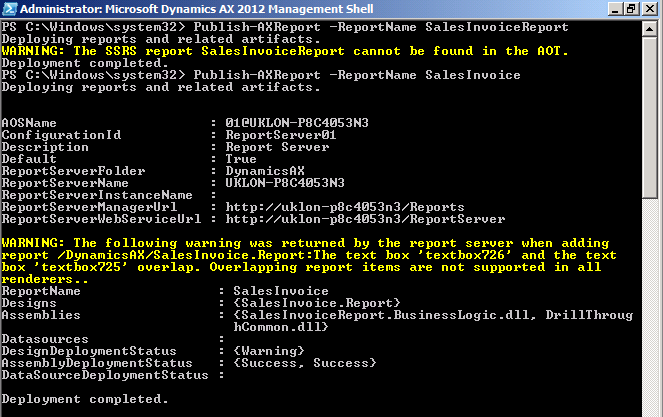
Eg. Publish-AXReport -ReportName SalesInvoice

*It is the report name under AOT > SSRS Reports > Reports > SalesInvoice, not the project name under AOT > Visual Studio Projects > Dynamics AX Projects > SalesInvoiceReport

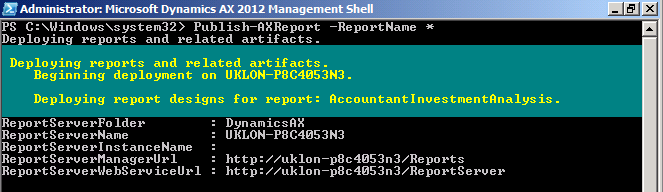
Publish-AXReport -ReportName * will deploy all report (use wildcard to deploy full set of report)

Report deployment in progress

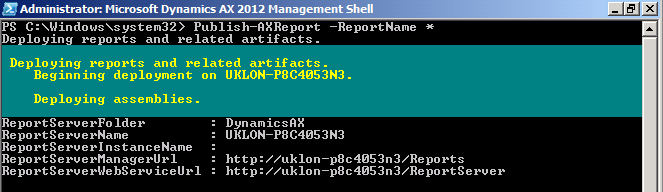
Report deployment in progress

Report deployment in progress

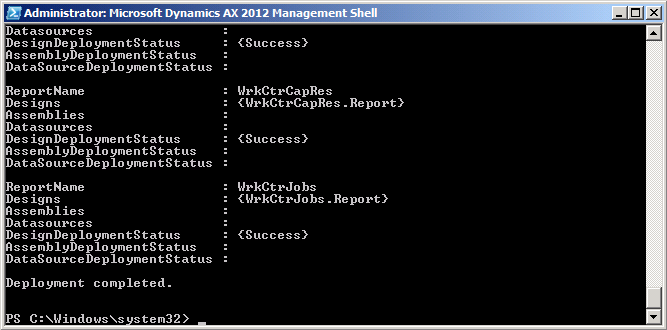
Report deployment completed

Report name should be the name under AOT > SSRS Reports > Reports > SalesInvoice,
not the project name under AOT > Visual Studio Projects > Dynamics AX Projects > SalesInvoiceReport

PowerShell grid view (Out-GridView) & Integrated Scripting Environment

When working in PowerShell, there're situation where the data is not fully displayed or difficult to read due to the way it was presented. Rather than showing them in a long list, PowerShell Integrated Scripting Environment (ISE) provides a convenient way to present and read them.

Follow these steps to install PowerShell Integrated Scripting Environment (ISE):
1. Go to: Server Manager > Features > Add features.
2. Check the checkbox for "Windows PowerShell Integrated Scripting Environment (ISE)"
3. Click "Next"
4. Click "Install"
5. Click "Close"


To show result in grid view, you can pipe it to Out-GridView.

Example with and without Out-GridView
> Get-Command -Module Microsoft.Dyn*
> Get-Command -Module Microsoft.Dyn* | Out-GridView
> Get-AXModel | Out-GridView

Get-Command -Module Microsoft.Dyn* | Out-GridView

Get-Command -Module Microsoft.Dyn*

Get-AXModel | Out-GridView

Thursday, 13 October 2011

Attempt to install Non-HTTP Activation failed with error code 0x80070643

Was installing IIS feature - WCF Activation this morning and hit this error:

Attempt to install Non-HTTP Activation failed with error code 0x80070643. Fatal error during installation.

After Googling and try and error, removal of .NET Framework 4 resolve the problem.

This resolve the issue:
1. Uninstall the .NET Framework 4.0 Extended
2. Re-run the WCF Activation installation
3. Reinstall .NET Framework 4.0 Extended

Refer to this link for more details: http://social.msdn.microsoft.com/Forums/en-US/wfprerelease/thread/ad2a2b32-c97b-4cf8-b532-976c3f6a83ae/


UPDATE
The steps mentioned above will break the "iisreset /restart". When do the iisreset, it stops the IIS, then it can't start it up after that. You'll find an error in Event Viewer with this details.

Event Id: 1023
=============================
Application: SMSvcHost.exe


Framework Version: v4.0.30319


Description: The process was terminated due to an internal error in the .NET Runtime at IP 000007FEE5732730 (000007FEE5730000) with exit code 80131506.
=============================
 
 
Due to it is just a new virtual server, I've stop speding too much time fixing it, instead, I just do a reinstallation and get the IIS done before anything else.
 
If you plan to enable the “Windows Communication Foundation (WCF) Activation”, you’re advised to enable that before installing .NET Framework 4.0.


(Path: Server manager > Features > Add features > .NET Framework 3.5.1 Features > WCF Activation)


You’ll hit an error when enabling it if you’ve installed .NET Framework 4.


Friday, 7 October 2011

UTCDateTime field in AX & filtering

When doing filtering at UTCDateTime field in AX, it needs extra caution and consideration. Reason was the timezone & daylight saving. In AX, the UTCDateTime appears to be one field, but it is saved as two separate field in SQL - an extra field with the same name postfix with "TZID".


UTCDateTime field in AX is stored as two field in SQL

When apply filter with a date, it only filter the datetime field, ignoring the timezone.


Eg.
The server time zone is London, with daylight saving.
When insert a value into UTCDateTime field in AX, it stores the value in SQL without the daylight saving.


- AX: "08/10/2011 00:30:00" (one hour ahead due to daylight saving)
- SQL: "07/10/2011 23:30:00" (stored in SQL without daylight saving)


The screenshots below shows some example of the data and result after apply the filter


Filter with "07/10/2011 00:00:00"
Records with "08/10/2011 00:30:00" appears in the result, it was due to the
actual value stored in SQL is "07/10/2011 23:30:00" which met the filtering criteria

Filter with "07/10/2011 00:00:00".."07/10/2011 23:59:59"
(this filtering value above is automatically converted by AX when "07/10/2011..08/10/2011" is entered)

Showing the datetime value stored in SQL

The actual query sent to SQL Server
SELECT A.TESTDATETIMEFIELD,A.TESTDATETIMEFIELDTZID,A.RECVERSION,A.RECID FROM TABLE2 A WHERE ((DATAAREAID='ceu') AND ((TESTDATETIMEFIELD>='2011-10-07 00:00:00') AND (TESTDATETIMEFIELD<='2011-10-07 23:59:59'))) ORDER BY A.DATAAREAID DESC,A.TESTDATETIMEFIELD DESC OPTION(FAST 1)


If date time filtering is crucial in your solution, you'll need to take extra caution on this.

Thursday, 6 October 2011

Display method "Go to main table"


Just a quick sample for those who need it.


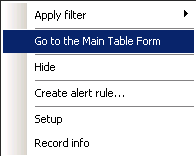
Assuming you have a display method and you want to have "Go to the Main Table Form" for that field, all you need to do is overwrite the "jumpRef()" method.

Go to the form's control, expand it, right click on the "method" node, then "Override method" > "jumpRef".

Eg.
\Forms\WebOrder\Designs\Design\[Tab:TabOrder]\[TabPage:OrderOverview]\[Grid:Grid]\StringEdit:quotationId\Methods\jumpRef

public void jumpRef()

{
    SalesQuotationTable salesQuotationTable;
    Args                args;
    MenuFunction        menuFunction;
    ;

    salesQuotationTable = SalesQuotationTable::find(this.text());

    if(!salesQuotationTable)
        return;

    args = new Args();
    args.caller(element);
    args.record(salesQuotationTable);

    menuFunction = new MenuFunction(
                       MenuItemDisplayStr(SalesQuotationTable),
                       MenuItemType::Display);
    menuFunction.run(args);
}


Sunday, 2 October 2011

Post/update sales quotation through X++

Unfortunately AX doesn't provide convenient API for sales quotation just like it provides for sales order which does the update in a few simple lines.


Eg.
salesFormLetter = SalesFormLetter::construct(DocumentStatus::PackingSlip); 
salesFormLetter.update(......)


For Sales quotation, it has the API for part of the status, that's to post/update "Lost" or "Cancel".
To post/update "Quotation" (Sent) or "Confirmation", you'll have to do a little bit of work.


Looking into \Classes\SalesQuotationEditLinesForm\mainOnServer(), it has almost everything you need to update the quotation, but it needs a bit of modification to run without user interaction.  The .prompt() in ::mainOnServer() collect some input through user interaction, you'll need to pass in these parameters to update the quotation so that you can skip the .prompt().


I'll skip elaborate further as I think by looking at a sample code, you'll immediately gets the idea.

The following code assume you have passed in the variable 'salesQuotationTable'.


=================================================================
/* UPDATE SALES QUOTATION TO "Sent" or "Confirmation"


SalesQuotationEditLinesForm  salesQuotationEditLinesForm;
ParmId                       parmId;
;


salesQuotationEditLinesForm = SalesQuotationEditLinesForm::construct(DocumentStatus::Quotation); //DocumentStatus
parmId                      = salesQuotationEditLinesForm.parmId();


salesQuotationEditLinesForm.initParmSalesQuotationTable(salesQuotationTable);


salesQuotationEditLinesForm.parmId(parmId);
salesQuotationEditLinesForm.parmTransDate(systemDateGet());
salesQuotationEditLinesForm.prePromptInit();
salesQuotationEditLinesForm.initParameters(NoYes::No, //printFormletter,
                                           NoYes::No, //transferHours2Forecast,
                                           NoYes::No, //transferExpenses2Forecast,
                                           NoYes::No, //transferFees2Forecast,
                                           NoYes::No, //transferItems2Forecast,
                                           'TheReasonCode', //reasonCode,
                                           NoYes::No); //usePrintManagement)
salesQuotationEditLinesForm.run();


=================================================================


/* UPDATE SALES QUOTATION TO "Lost" or "Cancelled"
salesQuotationUpdate = SalesQuotationUpdate::constructFromSalesQuotationTable(salesQuotationTable, SalesQuotationStatus::Cancelled);
SalesQuotationUpdate.run();

=================================================================


Microsoft Dynamics AX2012 Import-AXModelStore and behind the scene

The suggested method for deploying Dynamics AX2012 code into production environment (Eg. Go live) is to import the model store.

Read more about the difference between model and model store at this link: http://technet.microsoft.com/en-us/library/hh335184.aspx

Compare AX4, AX2009 and AX2012 deployment:
- AX4, AX2009: Copy layer and label files, replace the destination files (in application folder)
- AX2012: Export model store and import model store

There’re two ways to import model store:
1. Using PowerShell
2. Using AXUtil.exe

The rest of the text below will use PowerShell as the AXUtil will be obsolete in future version of Dynamics AX.

Start Dynamics AX PowerShell from here: All Programs > Administrative Tools > Microsoft Dynamics AX Management Shell

The steps:
  1. Export model store from your source (Eg. UAT environment)
    (Similar to AX2009 copy layer & label files)
    - Export model store
      
  2. Import model store to destination (Eg. Production environment)
    (Similar to AX2009 replace layer & label files)
    - Create a temporary schema
    - Import model store to temporary schema
    - Apply the model store

Export model store
Export model store is quite straight forward.
Syntax: Export-AXModelStore -File <filename> -Details
Eg. Export-AXModelStore -File “UAT.axmodelstore” –Details

What happen behind the scene?
The Export-AXModelStore connect to SQL server and access the AX database, then select and save the data into file (with the file name you specified in the command).

It gets the database name from AX server (AOS) configuration.
 
Export-AXModelStore with file name "STD_ModelStore"


Import model store

Create a temporary schema
Create a temporary schema in AX database to be used on next step during import model store.

Steps:
1. Open SQL Server Management Studio
2. Connect to the SQL Server instance where AX database resides
3. Expand to Databases > [AxDatabaseName] > Security > Schemas
4. Right click > New schema
5. Type in the temporary schema name (Eg. TempSchema) and select the schema owner and click "OK"
6. Initialize the temporary schema (Eg. Initialize-AXModelStore -AOSAccount "Domain\AccountName" -SchemaName <NewSchema> -Server <ServerName> -Database <DatabaseName>)

Import model store to temporary schema
Syntax: Import-AXModelStore -File <filename> -SchemaName
Eg. Import-AXModelStore -File UAT.axmodelstore -SchemaName TempSchema

What happen behind the scene?
The Import-AXModelStore read the *.axmodelstore file and do bulk insert.
It uses .NET SqlBulkCopy class and through TDS (Tabular Data Stream) pushing the data into AX model store tables.

You’ll see the command in SQL server like this: insert bulk [TempSchema].[ModelElementData] ([LayerId] Int, [ParentHandle] Int, [ElementHandle] Int, [LegacyId] Int, [Properties] VarBinary(max), [FileHeader] VarBinary(max), [BASEVERSION] Int, [VERSION] Int, [SAVECOUNT] Int, [CONSISTENCYDATA] Int, [MODIFIEDDATETIME] DateTime, [MODIFIEDBY] NVarChar(5) COLLATE SQL_Latin1_General_CP1_CI_AS, [CREATEDDATETIME] DateTime, [CREATEDBY] NVarChar(5) COLLATE SQL_Latin1_General_CP1_CI_AS, [ElementVersion] Int, [ModelId] Int) with (TABLOCK)

This "INSERT BULK" is different than the "BULK INSERT", it can’t be used in SQL server directly, it has to go through API.
 
Import-AXModelStore with file name "UAT.axmodelstore" and schema "TempSchema"


Apply the model store
Syntax: Import-AXModelStore -Apply:TemporarySchema
Eg: Import-AXModelStore -Apply:TempSchema

What happen behind the scene?
It execute several stored procedures to transfer the temporary schema to default.
Eg.
- XU_IsSchemaEmpty
- XU_CreateSchema
- XU_TransferObjectsToSchema
and etc

Apply model store (Import-AXModelStore -Apply) with the temporary schema imported earlier

You doesn't need to manually remove the temporary schema after apply it as they won't remain in the AX database after the APPLY process.

But if you decided not to apply the model store, you can remove it with the following syntax.

Syntax: Initialize-AXModelStore –Drop
Eg: Initialize-AXModelStore –Drop TempSchema


Alternative
If you prefer to directly import the model store into default schema and replace it, do remember when it hit ID conflict, the import will stop.

For more details about working on model store, visit this link:
http://technet.microsoft.com/en-us/library/hh433530.aspx
http://technet.microsoft.com/en-us/library/hh433540.aspx


Misc. screenshot during my test

Create AX model store (Initialize-AXModelStore)
 
Import-AXModelstore error due to database referred in AOS settings does not exist

Initialize-AXModelStore error on pre-release AX2012 database due to stored procedure - "XU_DropSchema" does not exist
Import-AXModelStore error when schema does not exist

Import-AXModelStore error when Id conflict detected
  
Apply AX model store (Import-AXModelStore -Apply) error when applying the RTM model store to pre-release AX database due to XU_CreateSchema does not exist in pre-release database

Apply AX model store (Import-AXModelStore -Apply) error when applying the RTM model store to pre-release AX database due to pre-release database stored proc is outdated, has different number of parameters

Some of the tables created using Initialize-AXModelStore (to get the full list, you can query the list of objects attached to the schema you created through the Initialize-AXModelStore)


Saturday, 1 October 2011

Error on Initialize-AXModelStore –Drop

If you're playing around with Initialize-AXModelStore in the AX database from pre-release of AX2012, you might hit error when trying to drop a schema.

Eg.
You created a model stored schema with Initialize-AXModelStore -AOSAccount "Domain\AccountName" -SchemaName <newschema> -Server <servername> -Database <databasename>
Then when you run Initialize-AXModelStore –Drop <schemaname>, you hit error claiming the XU_DropSchema does not exist.

It is simply because the pre-release database doesn't have the required stored procedure to drop the schema.


All you need to do is
  1. Gnerate CREATE script for XU_DropSchema from the new model store schema you just created
     
  2. Change the stored procedure name to [dbo].[XU_DropSchema], execute it
  3. Then rerun the Initialize-AXModelStore –Drop