Tuesday, 21 June 2016

Replenishment error - Location xxxxxx failed due to the strategy

Just a quick post for non-developer who hit this error and looking for solution.

Path to functionality:

  • Warehouse management > Periodic > Replenishments
  • Warehouse management > Inquiries > History > Work creation history log

The error message "Location xxxxxx failed due to the strategy" in "Work creation history log" is due to the "Total available" is less than "Physical stock".

Examples:
Before replenishment run:
- License plate 90, Physical stock = 106, Total available = 96
- License plate 91, Physical stock = 100, Total available = 100

When the replenishment run, it check whether it can locate a full license plate, if it can’t, then it give the “Location xxxxxx failed due to the strategy.” error.

The way it finds the full license plate is by checking the Total available against the Physical stock (this is a simplified explanation of the logic, it does much more than these two checking).

In this instance, LP 01C02E is not fully available (Physical stock is 106, but Total available is only 96), hence, error.
Then it check next LP, 01C03E, this is fully available (Physical stock is 100, Total available is 100), hence, successfully use it.


The code which checks and produce the error is location at this path: \Classes\WHSLocationDirective\performStrategyLPLocate

Wednesday, 15 June 2016

"The endpoint does not exist or the action is not allowed" on Payment journal voucher send

Just a quick post for non-developer who hit this error and looking for solution.

If you're setting up AIF Outbound port for Payment journal, you'll need to add the "LedgerVendorPaymentService.find" operation to the port.

Without this port, when you click on the "Send..." button on the Payment journal voucher, you'll first get the error "No endPoints are configured for the action".


But the "Send document..." dialog will still shows up, and if you continue to select the Port name and click "OK", you'll get the error "The endpoint does not exist or the action is not allowed".


To fix this issue:

  1. Go to: System administration > Setup > Services and Application Integration Framework > Outbound ports
  2. Select the respective port name and click “Deactivate”
  3. Click on “Service operations” button under the “Service contract customizations” FastTab
  4. Double click on the “LedgerVendorPaymentService.find” service operation under the “Remaining service operations” list to add it into the “Selected service operations”
  5. Close the form
  6. Click “Activate” button to activate the Outbound port again


Friday, 20 May 2016

Find AIF service class name by Axd document class name

Just a quick snippet to find AIF service class name by Axd document class name.


static void GetAxdClassNameByServiceName(Args _args)
{
    #avifiles
    str                     mySearchAxdName = "AxdCountingJournal"; //Change this to your Axd class name
    List                    list;
    ListEnumerator          listEnumerator;
    SysDictClass            sysDictClass, serviceDictClass;
    AxdWizardParameters     axdWizardParameters;
    int                     progressTotal, progressCount;
    SysOperationProgress    progressBar;
   
    sysDictClass = new SysDictClass(classnum(AifDocumentService));
    list = sysDictClass.extendedBy();
   
    progressTotal = list.elements();
    progressBar   = SysOperationProgress::newGeneral(#aviUpdate, 'Axd/service class search', progressTotal);
   
    listEnumerator = list.getEnumerator();
    while (listEnumerator.moveNext())
    {
        serviceDictClass = new SysDictClass(listEnumerator.current());
       
        progressCount++;
        progressBar.incCount();
        progressBar.setText(strfmt("Searching: %1 of %2 (%3)", progressCount, progressTotal, serviceDictClass.name()));       
        progressBar.update(true);
       
        if (serviceDictClass.id() != classNum(AifGenericDocumentService))
        {
            axdWizardParameters = AifServiceClassGenerator::getServiceParameters(serviceDictClass.name());
           
            if(axdWizardParameters && axdWizardParameters.parmName() == mySearchAxdName)
            {
                info(strFmt("Aif service class name: %1", axdWizardParameters.parmAifServiceClassName()));
                info(strFmt("Document name: %1", axdWizardParameters.parmAifEntityClassName()));
                info(strFmt("Axd name: %1", axdWizardParameters.parmName()));
                info(strFmt("Query name: %1", axdWizardParameters.parmQueryName()));
               
                break;
            }
        }
    }
   
    /*
    //Use this if you know the Document class name and wanted to find the Axd class name
   
    str                     documentClassName = "LedgerGeneralJournal";
    SysDictClass            documentDictClass;
    AifDocument             documentInstance;
    AxdBase                 axdBase;
   
    documentDictClass = new SysDictClass(className2Id(documentClassName));
    documentInstance = documentDictClass.makeObject();
    axdBase = documentInstance.getAxdInstance();
   
    info(strFmt("Document name: %1", documentClassName));
    info(strFmt("Axd name: %1", classId2Name(classIdGet(axdBase))));
    info(strFmt("Query name: %1", axdBase.getQueryName()));
    */
}

Tuesday, 26 April 2016

UTCDateTime field in AX & daylight saving

This is an addition to an old post "UTCDateTime field in AX & filtering" (http://mybhat.blogspot.my/2011/10/utcdatetime-field-in-ax-filtering.html).

When using the DateTimeUtil::newDateTime() method to create a datetime value, if you're using daylight saving, then you'll probably need to take extra care with the optional parameter in this method - Timezone.

Let's walk-through with an example.
Today is 26/04/2016, and this year the daylight saving ends on 30 Oct for UK.
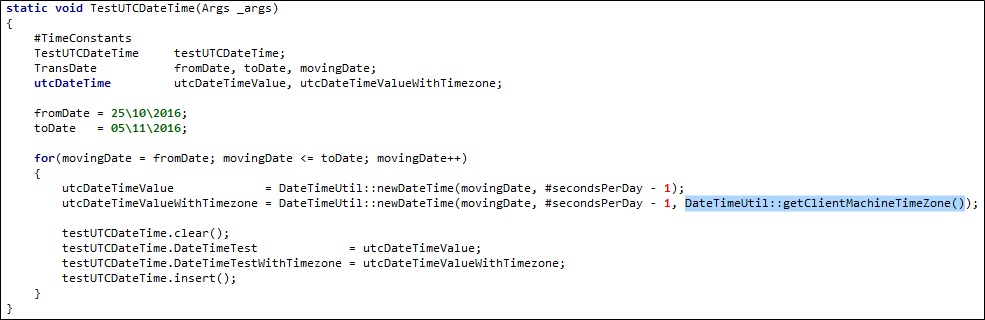
The job below generate datetime value from 25 Oct to 5 Nov, with the time a minute before midnight (11:59:59pm). One with the Timezone parameter and the other one without.


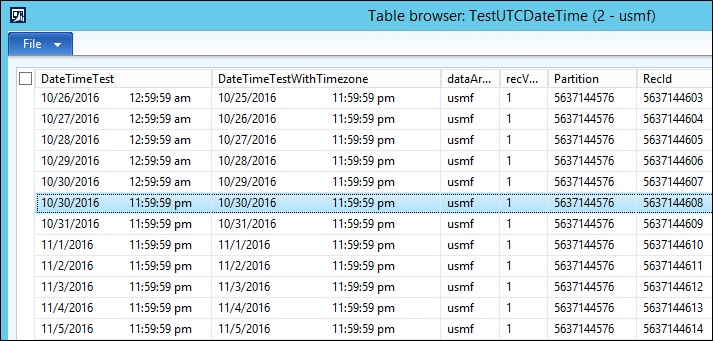
Below is the data if you view it in AX.
You'll notice the field "DateTimeTest" for records between 26/10 - 30/10 isn't showing 11:59:59pm, instead, it is showing 12:59:59am, Then looking at the field "DateTimeTestWithTimezone", it correctly display all the time value at 11:59:59pm.


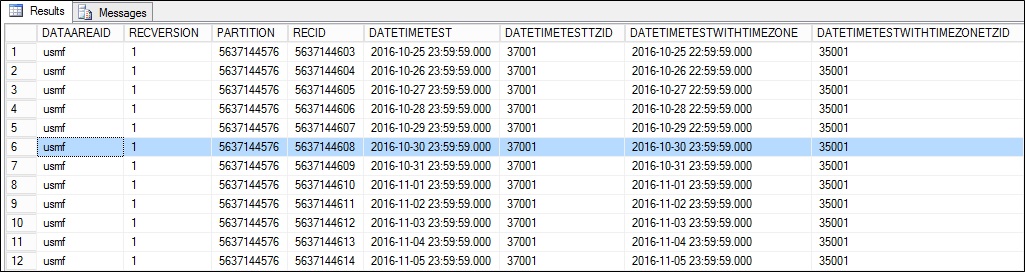
And if you look at the backend data in SQL, it was the other way round, the "DateTimeTest" field saved in all the record has the time value of 23:59:59.000, which is different from how it is shown in AX. If you look at the "DateTimeTestWithTimezone", for records between 25/10 - 29/10, it is saved with 22:59:59.000 and records after 29/10 is saved with 23:59:59.000.


AX will show time value based on your computer settings.
If you use daylight saving, it will automatically convert the time accordingly.
In the above example, the field "DateTimeTest" is assigned with a datetime value generated without the timezone parameter, so it is saved as 23:59:59.000 in SQL, when this value is shown in AX at a machine with daylight saving, it automatically fast forward an hour for the dates before the daylight saving ends, hence, 23:59:59 (11:59:59pm) becomes the next day 00:59:59 (12:59:59am).

It works the same way if user enter a datetime value. Says, user enter 01/05/2016, 5:00:00pm with a machine with daylight saving on, this value will be saved as 01/05/2016, 4:00:00pm in SQL.

Enjoy playing around with UTCDateTime!!!

Friday, 2 October 2015

Unable to move or delete files after reading it

Applies to: AX2012

Scenario
- Open file and read
- Move the file to another folder after reading is completed

Issue
While not running it in CIL, the code works, but once run it in CIL, it give the error "System.IO.IOException: The process cannot access the file because it is being used by another process".

Those who came from AX 2009 used to depends on AX to finalize an object by just leaving the scope. Ref: https://msdn.microsoft.com/en-us/library/io.finalize.aspx

But when running in CIL, the finalize needs to be called manually.

Below is a sample service class called by a controller, when running the code in CIL, if the 'finalize()' is called, no error occur. But if the 'finalize()' is not called, it give the error as shown above.

=================================================
class DemoService extends SysOperationServiceBase
{
}

=================================================
public void processDemo(DemoDataContract _contract)
{
    ;

    this.processFile(_contract.parmFileNameFrom());
    
    this.moveFile(_contract.parmFileNameFrom(), _contract.parmFileNameTo());
}

=================================================
void processFile(Filename _fileNameFrom)
{
    #File
    FileIoPermission                perm;
    TextIo                          importFile;
    container                       record;
    int                             totalRecords;
    ;

    perm = new FileIoPermission(_fileNameFrom, #io_read);
    perm.assert();

    importFile = new TextIo(_fileNameFrom, #io_read);

    while(importFile.status() ==  IO_Status::Ok)
    {
        record = importFile.read();

        totalRecords++;
    }
        
    if(totalRecords)
        info(strFmt("Row count: %1", totalRecords));

    //importFile.finalize(); //Enable and disable this comment to test the effect
}

=================================================
void moveFile(Filename _sourceFile, Filename _destinationFile)
{
    #File
    FileIoPermission            perm;
    ;

    perm = new FileIoPermission(_destinationFile, #io_write);
    perm.assert();

    System.IO.File::Move(_sourceFile, _destinationFile);
}


Friday, 8 May 2015

AIF process stuck / never ending (due to AIFResponse deletion)

Scenario of the issue
  • Created a document service (Eg. TableA) and Inbound port to test it
  • While running the test, the receive (AifGateWayReceiveService) is OK, but the processing (AifInboundProcessingService) seems to stuck there / never ending

In details
  • Start up 2 AX client, Eg ClientA and ClientB.
  • ClientA: The testing starts with getting the Inbound port (file adaptor) and XML file ready
  • Dump the XML into the inbound folder
  • ClientA: Run a simple job which contain this line new AifGateWayReceiveService().run();
  • ClientA: Check "Queue manager" (Path: System administration > Periodic > Service and AIF) and confirmed the message has gone in
  • ClientB: Run another simple job which contain this line new AifInboundProcessingService().run();
  • ClientA: Check the "Queue manager" and confirmed the line is gone and a new record has been inserted into the table used by the document service (Eg. TableA)
  • ClientB: The job seems not finishing, AX is frozen and not responding

Below is a sample of the simple job used in above steps (just toggle around the options).

boolean runReceive = true,
        runProcess = false;
    
if(runReceive)
{
    new AifGateWayReceiveService().run();
}
    
if(runProcess)
{
    new AifInboundProcessingService().run();
}


Investigation result
The frozen isn't actually hanging, instead, it is running some record deletion, which took AGES, hence, not responding.

Below is the Trace Parser screenshot showing the trace file captured for around 30 seconds.

Within this short period, there're thousands of calls to database server for a DELETE statement.

This DELETE statement came from the AIF which tries to delete the expired AIFResponse records.


This DELETE statement supposed to delete any records that's older than the expired datetime (used today's datetime minus the AIFGlobalSettings.ResponseCacheLifetime value). Typically a 24 hours timeframe is a common value. But this table contains millions of records (up to 2 years old of data is in this table).

The solution is to get rid to this data from SQL. Since this is development environment, truncate table would do. But if this production environment, it would need more care on how the data is deleted (performance, time of performing the deletion, recover mode & backup chain, etc).

Wednesday, 25 February 2015

Sort container and Array for Dynamics AX

Just a quick snippet for sorting container and Array object.

//Method to sort container
static container sortContainer(container _con)
{
    anytype     temp1;
    anytype     temp2;
    int         i;
    int         j;
    container   sortedCon;
    ;

    sortedCon = _con;

    // Sort the container
    for (i = 1; i <= conlen(sortedCon); i++)
    {
        for (j = i + 1; j <= conlen(sortedCon); j++)
        {
            temp1 = conpeek(sortedCon, j);
            temp2 = conpeek(sortedCon, i);

            if (temp1 < temp2)
            {
                sortedCon = condel(sortedCon, j, 1);
                sortedCon = conins(sortedCon, j, temp2);
                sortedCon = condel(sortedCon, i, 1);
                sortedCon = conins(sortedCon, i, temp1);
            }
        }
    }

    return sortedCon;
}

//Method to sort Array
static Array sortArray(Array _array)
{
    int         i;
    int         arrayCount = _array.lastIndex();
    container   con, sortedCon;

    //Switch from Array to container
    for(i = 1; i <= arrayCount; i++)
    {
        con = conIns(con, i, _array.value(i));
    }
    
    //Sort the container
    sortedCon = sortContainer(con);
    
    //Switch from container to Array
    for(i = 1; i <= conLen(sortedCon); i++)
    {
        _array.value(i, conPeek(sortedCon, i));
    }
    
    return _array;
}

Thursday, 12 February 2015

Copy table buffer between two table with similar structure

Just a quick snippet for those who need it.
The standard buf2Buf() method works if the field Id is identical, but in case the field name is same but have different Id, the code snippet below does the job. It is modified from the buf2Buf() to cater to two tables with similar structure and field name but different field Id.

static void buf2BufByName(
    Common  _from,
    Common  _to
    )
{
    DictTable   dictTableFrom   = new DictTable(_from.TableId);
    DictTable   dictTableTo     = new DictTable(_to.TableId);
    DictField   dictFieldFrom;
    FieldId     fieldIdFrom     = dictTableFrom.fieldNext(0);
    FieldId     fieldIdTo
    ;

    while (fieldIdFrom && ! isSysId(fieldIdFrom))
    {
        dictFieldFrom   = new DictField(_from.TableId, fieldIdFrom);

        if(dictFieldFrom)
        {
            fieldIdTo = dictTableTo.fieldName2Id(dictFieldFrom.name());

            if(fieldIdTo)
                _to.(fieldIdTo) = _from.(fieldIdFrom);
        }

        fieldIdFrom = dictTableFrom.fieldNext(fieldIdFrom);
    }
}

Wednesday, 29 October 2014

Asus RT-AC68U with Maxis fiber and Astro IPTV

For those who interested to get Maxis fiber + Astro IPTV working with Asus RT-AC68U router, below are the settings I used and it works for me (both Internet and IPTV is working).

*The backbone is TM Fiber

The main configurations are the WAN and IPTV settings, the rest you may set it up as you would normally do.

Physical connection
- Cable from modem LAN port to Asus router WAN port
- Cable from Asus router LAN port 4 to Astro IPTV decoder

WAN
- WAN Connection Type: PPPoE
- User name: <your user Id>@home.maxis.com.my
- Password: <your password>

*Call the support line if you don't have this information.

IPTV
- Select ISP Profile: Manual
- Internet: VID = 621
- LAN port 4: VID = 823
- LAN port 3: WID = 822

Credit to: schizophreak (lowyat.net forum user)
Ref:
https://forum.lowyat.net/topic/1506242/+1480
https://forum.lowyat.net/topic/1506242/+1700

Some screenshots of the settings


Update [03/11/2014]
After around 2 days and 2 hours of use, my family member told me the Astro is not working. I tried restart the router and modem, still not working. Then checked the Astro IPTV settings (Network > Diagnostics), it shows an IP received from Maxis directly (10.xxx.xxx.xxx), Unfortunately I forgotten to capture the screenshot, can't really remember the details of the IPs. It supposed to use a local IP, but it wasn't, so I guess the connection isn't right, hence, the IPTV doesn't work.

So I turn on the router from Maxis again and connect:
- Cable from modem LAN port to Maxis' router WAN port
- Cable from Maxis' router LAN port to Astro IPTV decoder

Then the Astro IPTV works again.
This time it receive a local IP - 192.168.1.64


After that, reconnect the cable back to the Asus router just as before I did anything and it works.
- Cable from modem LAN port to Asus router WAN port
- Cable from Asus router LAN port 4 to Astro IPTV decoder

So, it seems like when connected to the Asus router, the Astro IPTV decoder didn't receive a proper IP to get it working. I'm now on this 2nd round of connection for 2 days 18 hours, it is still working.

Update [12/11/2014]
11 days 19 hours+ past, Astro IPTV is still working.
But found a drawback of using this router with Astro IPTV - it won't download program data (at least, pressing "Info" shows nothing).


Update [17/11/2014]
Coming back from a weekend day out, turning on the Astro found it "dead". Astro is not working anymore. Opening the Settings > Network > IP Diagnostics found it showing an invalid IP.


I'm done with the testing of this configuration and has switch it back to the old config/setup - Cascade router.

The setup/config:
- Cable from modem LAN port to Maxis' router WAN port
- Cable from Maxis' router LAN port to Astro IPTV decoder
- Cable from Maxis' router LAN port to Asus AC68U router, then set the router with this config/settings:
   > Administration\Operation mode\Remains as router mode
   > LAN\DHCP Server\Enable the DHCP Server = No
   > WAN\WAN connection type = Automatic IP

Using this setup/config, I still can utilize most of the features in the Asus router (Eg. QoS), apart from those who need Internet access (Eg. built in VPN).


Log:
- 29/10/2014, ~4.30pm (GMT+8): Switch from Maxis router to Asus RT-AC68U (Internet & IPTV working)
- 31/10/2014, ~6.30pm (GMT+8): Astro not working (Internet still working)
- 01/11/2014, ~2.15am (GMT+8): Reconnect to Maxis router to get IPTV working, then connect it back to Asus router
- 03/11/2014: ~8.15pm (GMT+8): Checked Astro IPTV and Internet still working on Asus router
12/11/2014: ~10.15pm (GMT+8): Checked Astro IPTV and Internet still working on Asus router
16/11/2014: Astro IPTV is "dead", switch it back to the original configuration - Cascade router

Thursday, 2 October 2014

Manually run specific AIF port

To manually run a specific AIF inbound port (File adapter), the "AifImportUtil::processFile()" static method can be used.

It accept two parameters:
1. Input file name
2. Port name

Eg. AifImportUtil::processFile("\\\\serverName\\sampleFile.csv", 'SampleInboundPortName');

AIF Inbound port error - Failed to create a session; confirm that the user has the proper privileges to log on to Microsoft Dynamics

Area: AIF
Error: Failed to create a session; confirm that the user has the proper privileges to log on to Microsoft Dynamics

We have a few AIF inbound port setup (File adapter), tested and working.
But when user put in the same file, the process failed and we're getting the error mentioned above.

The reason was due to the user who put the file into the inbound port folder is not an AX user.

AIF is using the file owner as the submitting user and this is the user who caused the error.

To view:
  • File owner: Right click on the file > Properties > Details (tab) > Owner
    *Alternatively, open the folder in Windows Explorer, change to "Details" view, add the "Owner" column.
  • Submitting user: System administration > Periodic > Services and Application Integration Framework > Queue manager > Details (tab) > Users (group) > Submitting user


Saturday, 6 September 2014

Copy AX and model database permission (stored proc & view)

Sometimes during development or testing, we might need to create/copy environment. The easiest method is to copy the AX and model database from a source environment, then restore it to the destination environment. If each of the environment (AOS) has different service account, then you might hit permission error during start up of the AOS (if permission haven't been granted yet).

The AOS service account needs certain permission on both of the database, creating it manually will be a lot of work, Instead of doing that, scripting it out would be much easier.

Steps:
#1. Execute the following script from the source environment

set nocount on

Print 'Column Level Privileges to the User:'
select 'grant '+privilege_type+' on '+table_schema+'.'+table_name+' ('+column_name+') to ['+grantee+']'+
case IS_GRANTABLE when 'YES' then ' With GRANT OPTION'
else '' end from INFORMATION_SCHEMA.COLUMN_PRIVILEGES
Print 'Table Level Privileges to the User:'select 'grant '+privilege_type+' on '+table_schema+'.'+table_name+' to ['+grantee+']' +
case IS_GRANTABLE when 'YES' then ' With GRANT OPTION'else ''
end from INFORMATION_SCHEMA.TABLE_PRIVILEGES
Print 'Privileges for Procedures/Functions to the User:'
select 'grant execute on '+c.name+'.'+a.name+' to ['+user_name(b.grantee_principal_id)++']'+
case state when 'W'
 then ' with grant option'else ''
  end from sys.all_objects a, sys.database_permissions b,
  sys.schemas c
  where a.object_id = b.major_id and a.type in ('P','FN') and b.grantee_principal_id <> 0 and b.grantee_principal_id <>2

  and a.schema_id=c.schema_id


Ref: http://social.msdn.microsoft.com/Forums/sqlserver/en-US/758e2485-1def-4549-a4d4-4568b028009d/copy-user-permission

#2. Replace the service account name
Eg. Replace all "AOSService_STD" with "AOSService_DEV"

#3. Execute the result of the script to the corresponding destination database

Thursday, 4 September 2014

AX 2012 R3 email report not working

One of the common requirement for report is emailing (Eg. nightly batch run and email the report).

Standard AX does provides this feature, but unfortunately AX 2012 R3 RTM seems to have a bug over here.

Given the Print destination settings below, it looks OK on the first look, but it wasn't. The problem with it is the Cc field is empty.

It uses the SrsReportRunMailer class, emailReport method to send the email.
The mailer.quickSend() method call has all the parameters passed in (including the Cc).

Here's where the problem comes from, the SysMailerNet class, quickSend method. is checking the Cc value using prmisDefault() method.

Sequence:
1. Print destination settings doesn't provides value in Cc field
2. Empty string is passed in as parameter value in quickSend method
3. Due to empty string is passed in, the Cc parameter is no longer default value
4. Validating using the prmisDefault method is incorrect due to Cc is no longer default value (it should just check whether the Cc has value or not - Eg. if(cc){...})

The error occur when it reach the line - ccs.add(cc).
If cc is empty, it error and stop there.


There're two quick solutions here:
1. Enter a value in Cc field
2. Modify the code, use if(cc){...} instead of if(!prmisDefault(cc)){...}


Wednesday, 20 August 2014

Retail sync job failed due to table field definition changed

A quick intro of the environments/installation:
1. Developed version of AX 2012 R3
2. Standard retail components (Eg. Channel database, Async server, Async client, Real-time service etc)

When running the sync job from Distribution Schedule, we came across this error - "System.InvalidOperationException: The given value of type String from the data source cannot be converted to type nvarchar of the specified target column. ---> System.InvalidOperationException: String or binary data would be truncated.".

A quick guess would be the retail channel database is standard but pointing to a developed version of AX, some table field(s) might have been changed (Eg. Field length increased).

To find out which field length has changed/different between the two environment, the script below is used:

select S.tableName, S.name, S.max_length, D.max_length
  from                                                
      (select ST.name as tableName, SC.*              
         from ChannelDatabaseName.sys.tables ST       
        inner join ChannelDatabaseName.sys.columns SC 
           on ST.object_id = SC.object_id             
      ) AS S                                          
  join                                                
      (select DT.name as tableName, DC.*              
         from AxDatabaseName.sys.tables DT            
        inner join AxDatabaseName.sys.columns DC      
           on DT.object_id = DC.object_id             
      ) as D                                          
    on S.tableName   = D.tableName                    
   and S.name        = D.name                         
 where S.max_length != D.max_length                   

*NOTE: You might want to narrow down to just the tables in the failing sync scheduler jobs/subjobs by adding the table name into the query above.

This will give a list of the table and field names where the field length is different.

Once the list of table and field name is generated, then the field length is altered on the channel database.

Eg. ALTER TABLE [ax].[LOGISTICSPOSTALADDRESS] ALTER COLUMN COUNTY nvarchar(60)

Rerun the job and the error goes away.


Full stack trace

ApplySessionFileToClientDatabase encountered ProcessSourceRequestHeaderExceptionMicrosoft.Dynamics.Retail.StoreConnect.Request.SQLHandler.ProcessSourceRequestHeaderException: ProcessTargetRequestHeader failed due to an InvalidOperationException.
connectionString: Data Source=ServerName;Initial Catalog=RetailDatabaseName;Integrated Security=True;Connect Timeout=60;Application Name="Commerce Data Exchange Async Client" ---> System.InvalidOperationException: The given value of type String from the data source cannot be converted to type nvarchar of the specified target column. ---> System.InvalidOperationException: String or binary data would be truncated.
   at System.Data.SqlClient.SqlBulkCopy.ConvertValue(Object value, _SqlMetaData metadata, Boolean isNull, Boolean& isSqlType, Boolean& coercedToDataFeed)
   --- End of inner exception stack trace ---
   at System.Data.SqlClient.SqlBulkCopy.ConvertValue(Object value, _SqlMetaData metadata, Boolean isNull, Boolean& isSqlType, Boolean& coercedToDataFeed)
   at System.Data.SqlClient.SqlBulkCopy.ReadWriteColumnValueAsync(Int32 col)
   at System.Data.SqlClient.SqlBulkCopy.CopyColumnsAsync(Int32 col, TaskCompletionSource`1 source)
   at System.Data.SqlClient.SqlBulkCopy.CopyRowsAsync(Int32 rowsSoFar, Int32 totalRows, CancellationToken cts, TaskCompletionSource`1 source)
   at System.Data.SqlClient.SqlBulkCopy.CopyBatchesAsyncContinued(BulkCopySimpleResultSet internalResults, String updateBulkCommandText, CancellationToken cts, TaskCompletionSource`1 source)
   at System.Data.SqlClient.SqlBulkCopy.CopyBatchesAsync(BulkCopySimpleResultSet internalResults, String updateBulkCommandText, CancellationToken cts, TaskCompletionSource`1 source)
   at System.Data.SqlClient.SqlBulkCopy.WriteToServerInternalRestContinuedAsync(BulkCopySimpleResultSet internalResults, CancellationToken cts, TaskCompletionSource`1 source)
   at System.Data.SqlClient.SqlBulkCopy.WriteToServerInternalRestAsync(CancellationToken cts, TaskCompletionSource`1 source)
   at System.Data.SqlClient.SqlBulkCopy.WriteToServerInternalAsync(CancellationToken ctoken)
   at System.Data.SqlClient.SqlBulkCopy.WriteRowSourceToServerAsync(Int32 columnCount, CancellationToken ctoken)
   at System.Data.SqlClient.SqlBulkCopy.WriteToServer(IDataReader reader)
   at Microsoft.Dynamics.Retail.StoreConnect.Request.SQLHandler.SCSqlWriteRequestRunner.BulkCopyData(SqlConnection connection, SqlTransaction transaction)
   at Microsoft.Dynamics.Retail.StoreConnect.Request.SQLHandler.SCSqlWriteRequestRunner.Run(SqlConnection connection, SqlTransaction transaction)
   at Microsoft.Dynamics.Retail.StoreConnect.Request.SQLHandler.SCSqlTargetRequestHandler.ProcessWriteRequest(SqlConnection connection, SqlTransaction transaction)
   at Microsoft.Dynamics.Retail.StoreConnect.Request.SQLHandler.SCSqlTargetRequestHandler.ProcessTargetRequestHeader(ISCTargetRequestHeader targetRequestHeader)
   --- End of inner exception stack trace ---
   at Microsoft.Dynamics.Retail.StoreConnect.Request.SQLHandler.SCSqlTargetRequestHandler.ProcessTargetRequestHeader(ISCTargetRequestHeader targetRequestHeader)
   at Microsoft.Dynamics.Retail.SynchClient.Core.DownloadAgent.ApplySessionFileToClientDatabase(SessionManager sessionMgr, String fileName)

Friday, 11 April 2014

New field added to Dynamics AX retail table not sync during pull job

Just a quick note, if you made changes to retail table which is used on pull job, the related temporary table needs to be updated as well. The temporary table should be updated using the "Create staging table" button instead of updating it manually from AOT.