Showing posts with label SQL Server. Show all posts

Tuesday, 21 February 2017

Ineffective execution plan due to outdated statistics

Recently encounter a performance issue where the query plan generated is ineffective due to outdated statistics.

  1. There'a batch job periodically updating a table (recurrence job) based on the daily activities on another table
  2. External call from web - calling a stored proc and executed a query (generated the execution plan and cached it)
  3. One of the occurrence has made large number of record update but not large enough to hit the threshold to trigger statistic update
  4. External call from web - calling the same stored proc
  5. Due to the large update on #3 has cause the data changes, the query plan no longer effective
  6. The query in the stored proc is running extremely long

TableA: ~16m records
TableB: ~1m records
TableC: ~100k records
TableD: ~10k records
TableE: ~5 records

The query in the stored proc is joining a few table (Eg. TableA - E), one of the table always has very few records (between 1 to 10), on normal circumstances, the query always generated a query plan which join TableE first to other table so that it reduce the number of records required on the next join to the rest of the table.

But somehow the first run of the stored proc has generated a query plan which use TableC as first join, joining it to TableA, then to TableB, TableD, and TableE. This appear to be correct on that run itself due to the parameter value passed in does run (slightly) better with this plan. But the next time when it run, unfortunately the previously cached plan is bad for that parameter, it has cause the query run much longer.

TableE is specifically designed to reduce the join operation, but unfortunately on the bad query plan, it put it to the last join operation, hence doing a lot of unnecessary join.

The solution we put in is to make the TableE join with TableA as subquery.
All other join has where condition which correlated to TableA, so this will make the subquery being executed first, this then achieve our initial purpose, to ensure the join order always has the TableE first, then the rest of the order does not matter, they can be join as SQL optimizer feel appropriate.

Thursday, 21 November 2013

Dynamics AX 2012 R2 Retail deployment with SQL Server named instance

Just a quick post to share the experience on deploying Dynamics AX 2012 R2 Retail online store with SQL Server named instance.
The deployment is done by following the guide at: http://technet.microsoft.com/en-us/library/jj991927.aspx

In brief:
  • The Online store deployment script is not written to covers SQL Server named instance
  • If you’re using a named instance instead of default instance, the easiest way is to make the named instance listen to default port (act like a default instance)

More details:

I was doing a fresh installation (Windows Server 2012, SQL Server 2012, SharePoint 2013, Dynamics AX 2012 R2, and their respective Service Pack or Cumulative Update).

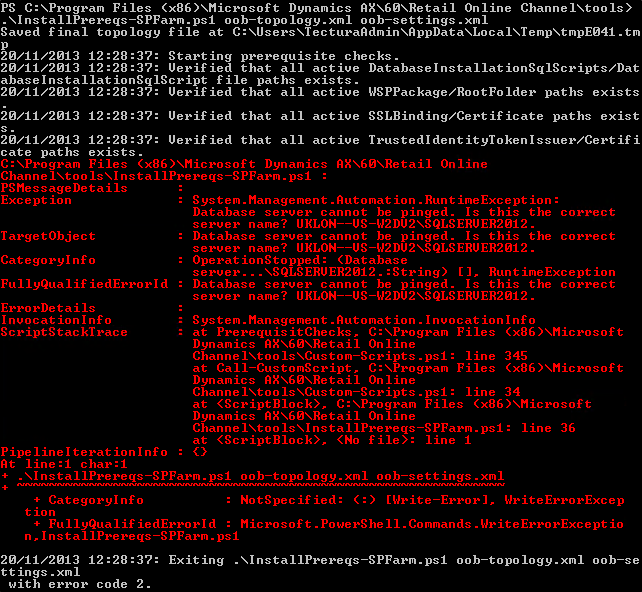
All goes well until I reach the Online store deployment stage, the PowerShell script “InstallPrereqs-SPFarm.ps1” is complaining the server cannot be pinged. Digging down to the script, it was testing the connection to the server by using the instance name.


Below is part of the “oob-topology.xml” file.
    <Database install="true" dropifexists="true">
      <ServerName>UKLON--VS-W2DV2\SQLSERVER2012</ServerName>
      <DatabaseName>SpFBA</DatabaseName>
      <WindowsLogin id="RetailFBAFullAccessUsers" GroupName="UKLON--VS-W2DV2\RetailFBAFullAccessUsers" CreateIfNotExists="true" MappedSqlRoleName="aspnet_Membership_FullAccess" />
    </Database>
    <WindowsGroupMemberShips>
      <add MachineName="UKLON--VS-W2DV2" GroupName="RetailFBAFullAccessUsers" UserName="TECTURA\sharepointadmin" />
      <add MachineName="UKLON--VS-W2DV2" GroupName="RetailFBAFullAccessUsers" UserName="TECTURA\sharepointadmin" />
</WindowsGroupMemberShips>

Reading the script further, it was found that it assume the SQL server is a default instance, therefore using the server name for the following usage:
  • To access the SQL server instance / configure SQL access
  • To access Windows server / configure security group
  • To check/validate the server name match the security group server name

    Due to it assume the SQL Server is default instance, the server name itself would be the name of the Windows server as well. 
    It then compare this against the machine name. This won’t cause issue if it is a default instance, which both the SQL Server instance name and the Windows server name would be the same. But if you have a named instance for your SQL Server, this would cause issue, it is comparing “ServerName\NamedInstance” against “ServerName”, which give error due to mismatch.

Initially I thought I would just change the “oob-topology.xml” file to use the SQL server named instance as “ServerName” and the Windows server name as “MachineName”.

Then make some changes to the script to cater to this, but it seems that it is used in many places, changing it bit by bit and keep hitting error due to the same reason from various different place is not fun.

So I took another approach, to make the SQL server named instance to “act” like a default instance, that way it can have the same value for both the “ServerName” and “MachineName”.

To do this, below are the steps:
  1. Go to: SQL Server Configuration Manager > SQL Server Network Configuration > Protocols for <theNamedInstance>

  2. Enable the “TCP/IP” is it hasn’t been enabled
  3. Then right click on the “TCP/IP” and click on “Properties”

  4. Click on “IP Addresses” tab, scroll to the bottom

  5. At the “IPAll”, empty the “TCP Dynamic Ports” and enter ‘1433’ for “TCP Port”
  6. Click “OK” to apply and close it, restart SQL Server as needed

This will make the SQL Server named instance listen to port 1433 (default port). Therefore it can access the SQL Server named instance by both the following:
  • ServerName\NamedInstance
    Eg. In my case: UKLON--VS-W2DV2\SQLSERVER2012
  • ServerName
    Eg. In my case: UKLON--VS-W2DV2

    Screenshot showing the SQL Server accessible by both the server name itself and the named instance as well.

Then change the “oob-topology.xml” file to use the server name only.
    <Database install="true" dropifexists="true">
      <ServerName>UKLON--VS-W2DV2</ServerName>
      <DatabaseName>SpFBA</DatabaseName>
      <WindowsLogin id="RetailFBAFullAccessUsers" GroupName="UKLON--VS-W2DV2\RetailFBAFullAccessUsers" CreateIfNotExists="true" MappedSqlRoleName="aspnet_Membership_FullAccess" />
    </Database>
    <WindowsGroupMemberShips>
      <add MachineName="UKLON--VS-W2DV2" GroupName="RetailFBAFullAccessUsers" UserName="TECTURA\sharepointadmin" />
      <add MachineName="UKLON--VS-W2DV2" GroupName="RetailFBAFullAccessUsers" UserName="TECTURA\sharepointadmin" />
</WindowsGroupMemberShips>

Wednesday, 24 October 2012

Dynamics AX services login & SQL access/security risk

Dynamics AX AOS service login require only a few access and this would prevent developer doing some funny thing around the database. But sometimes when DBA doesn't give a throughout thought on it, it might cause security issue.

Eg.
DBA is requested to look at an AOS start up issue, rather than checking and fixing it properly, a sysadmin role is granted to the AOS service login as a quick fix. Sometimes under urgency or pressure, this might be a quick fix, but it would cause security risk issue. Although this role is granted only to the AOS service login, but developer with AOT access can issue a direct SQL statement to grant themselves the sysadmin role now.

Running the job below would grant the sysadmin role.

static void UpdateSQL(Args _args)
{
    str                             sql;
    Connection                      connection = new Connection();
    SqlStatementExecutePermission   sqlPerm;
    Statement                       statement;
    int                             rowsAffected;
    ;

    try
    {
        sql     = "EXEC master..sp_addsrvrolemember @loginame = N'Domain\\Username', @rolename = N'sysadmin'";
        sqlPerm = new SqlStatementExecutePermission(sql);
        sqlPerm.assert();

        statement    = connection.createStatement();

        rowsAffected = statement.executeUpdate(sql);

        CodeAccessPermission::revertAssert();
    }
    catch
    {
    }
}

Tuesday, 9 October 2012

Trick to add included column in AX2009

Ref. and more details at: http://daxdilip.blogspot.com/2011/05/tip-how-to-avoid-overriding-of-sql.html

In brief, included column is not supported in AX2009, but is now supported in AX2012.
To work around that in AX2009, it is to write the included column SQL statement and fire it up at the end of the AX synchronization (\Classes\Application\dbSynchronize).

You'll need to put some thought on the pro and cons before implement it, a proper control procedure should be put in place due to other developer from your project team might not aware of this extra SQL script.

Pro:
- Included column available in AX2009

Cons:
- Maintenance of the index
- Overhead during synchronization (index will first be dropped then recreated)

*Note
- New index created outside of AX (directly into the table in SQL) will be dropped during synchronization
- Included column added directly from SQL into existing AX table's index will be dropped only if you made changes to that index in AX AOT node

Alternatively, Advanced Storage Management seems to offer this feature, I've never try it before, but thought just mention it here for anyone who looking for options.
URL: http://www.aximprove.co.uk/product_AdvancedStorageManagement.html

Friday, 27 April 2012

SQL Server login timeout on first attempt, second immediate attempt success

Was having a login issue today with SQL Server after the installation.
There're 2 servers, one for AOS and another one for SQL Server.
Both server running Windows Server 2008 R2.
The SQL Server has 2 named instance (one SQL Server 2005 and another one SQL Server 2008 R2), firewall enabled, Named Pipes & TCP/IP has been enabled, port for SQL Server has been opened.
(Ref: http://support.microsoft.com/kb/968872)
SQL Server Browser service is running.


When starting up the AOS, it failed with the error message below: 
Object Server 12: Fatal SQL condition during login. Error message: "[Microsoft][ODBC SQL Server Driver]Timeout expired"


Trying to connect to the SQL Server using SSMS (from another server) gives this error:
Timeout expired. The timeout period elapsed prior to completion of the operation or the server is not responding. (Microsoft SQL Server, Error: -2)


First attempt to connect using SSMS failed with the above message, but on second attempt, it immediately connected, login success. It seems weird the login only timeout or failed on first attempt. This error can be consistently replicated, just close the SSMS, reopen and try login again, the error occur, then second login works.


Tried changed the "Remote Login Timeout" settings (Under SQL Server instance properties, on the "Advanced" page) to a higher number, but it doesn't help, the first login attempt still failed.


After further investigation, the reason was actually on the SQL Server Network Configuration.
The SQL Server is listen to dynamic ports.


Resolution: Change it to fixed port number
- Open SQL Server Configuration Manager
- Expand SQL Server Network Configuration
- Select the SQL Server instance you wanted to connect to
- Double click on TCP/IP
- Select the IP Addresses tab
- Under the IPAll group, remove the value in "TCP Dynamic Ports"
- Enter "1433" into "TCP" port (you can change the port according to your needs)


That resolve the issue.


SQL Server port settings


Tuesday, 27 September 2011

Dynamics AX [SQL Native Client] Connection is busy with results for another command

Earlier today hit an error when trying to do an insert while looping through a ResultSet returned from stored procedure executed from Dynamics AX. The error was "[SQL Native Client]Connection is busy with results for another command".

A quick fix to it is to close the connection before the INSERT.

============================================================================

Connection       sQLConnection;
Statement        sQLStatement;
str              sql;
TestTableA       testTableA;
RecordInsertList rilTestTableA  = new RecordInsertList(tableNum(TestTableA));
boolean          recordInserted = false;
;

sql = strFmt("EXEC testStoredProc '%1'", dataAreaId);

new SqlStatementExecutePermission(sql).assert();

sQLConnection = new Connection();
sQLStatement  = sQLConnection.createStatement();
resultSet     = sQLStatement.executeQuery(sql);

CodeAccessPermission::revertAssert();

while(resultSet.next())
{
    recordInserted = true;

    testTableA.clear();
    testTableA.Field1 = resultSet.getInt(1);
    testTableA.Field2 = resultSet.getString(2);

    rilTestTableA.add(testTableA);
}

sQLStatement.close(); //Close the connection before the insert else it will
                      //cause the "SQL Native Client]Connection is busy with
                      //results for another command" error

if(recordInserted)
{
    rilTestTableA.insertDatabase();
}
==============================================================================

You might want to consider turning off the row count in stored procedure as well else you'll get an extra result which is the row count.

Field1      Field2
----------- ----------
100001      TestData1
100002      TestData2

(2 row(s) affected)


Use "SET NOCOUNT ON" to turn it off in your stored procedure.
Eg.

CREATE PROCEDURE [dbo].[testStoredProc]

    @DATAAREAID NVARCHAR(4)
AS


SET NOCOUNT ON

SELECT Field1, Field2 FROM SourceTableA

GO


*Updated 02/10/2012
One of my co-worker told me if this issue occur due to running stored procedure, run it without EXEC keyword will resolve it as well. I haven't test this yet but thought I should just update this post.
Eg. EXEC sp_testStoredProc 'param'

Tuesday, 21 September 2010

Basic algorithm for the "Auto update statistics"

This is an excerpt from one of the support call I read recently, thought it would be beneficial to share it.

========================

Basically the SQL database engine will not update statistics every time a record is change, added or deleted. There is a change threshold for each table, and this is what effect the statistics update. So if you have a customer with large tansaction volumes, you could find that this update process is not triggered frequently enough.

The following describes the basic algorithm for the "auto update statistics" process:
  1. If the cardinality (in most cases this means row count) for a table is less than six and the table is in the tempdb database, auto update with every six modifications to the table.
  2. If the cardinality for a table is greater than 6, but less than or equal to 500, update status every 500 modifications.
  3. If the cardinality for a table is greater than 500, update statistics when (500 + 20 percent of the table) changes have occurred.
  4. For table variables, cardinality changes does not trigger auto update statistics.

Therefore you may find that large tables are only statistically updates when the row count increases by 20%. But this does not really take into account updates, and this does not change the row count. Therefore you may find that if you make lots of updates, the data statistics on the are not in tune with this updated data. So in this case, updating the statistics manually from a scripts would help the query optimiser when the process is run.

========================