Tuesday, 14 May 2013

Document service / AIF ports deployment for Dynamics AX2012

Deploying AIF ports involve several steps, that's to export the ports data, import, and reactivate.
The steps below shows the process to deploy Inbound ports.

  1. Create AIF definition group
    - Login to source environment, go to path: System administration > Common > Data export/import > Definition groups
    - Create new definition group record, click "Clear" button to clear the other default options, click OK


    - Click "Select tables" and enter "AifInboundPort" in 'Name of table', check the checkbox for 'Apply criteria' & 'Specify related tables'
    (you may repeat all the steps with "AifOutboundPort" as the value in 'Name of table' for deploying Outbound ports)


    - Click "Select related tables".
    - Make sure the relationship level is 2, if it is not, then click on the "<<" or ">>" to adjust it.
    - Uncheck "BarcodeSetup" and "ExtCodeTable", then click "Select all remaining levels".


    - After "Select all remaining levels" is clicked, additional tables will be selected.


    - Summary showing more tables are selected.


    - If you wanted to export only some of the Ports, then click "Export criteria".
    - Create a filter on "Port name" field, then select the Ports that you wanted to export/deploy.


  2. Export AIF Inbound Ports
    - Using the definition group created above, export the data from source environment.

  3. Import AIF Inbound Ports
    - Login to destination environment, go to path: System administration > Common > Data export/import > Import.
    - Select the source file (exported in Step #2) and import (you may select Advanced > Update existing record if you’re updating).

  4. Deactivate the imported ports
    - After the import is completed, deactivate all the ports that you’ve just imported.
    - Path: System administration > Setup > Services and Application Integration Framework > Inbound Ports
    - Select the Port name and click on "Deactivate"


  5. Register services
    #Option 1
    Path: System administration > Setup > Checklists > Initialization checklist
    Expand the Initialize system node
    Click "Set up Application Integration Framework"

    #Option 2
    Path: AOT > Services > Right click on the services > Add-Ins > Register services
    *Do this for each of the services you need

  6. Update the ports configuration
    Update the configuration details for each of the imported port.
    Eg. Update the URI that were used in the source environment to URI that's based on paths in the destination environment.

  7. Reactivate each of the port imported earlier
    - Path: System administration > Setup > Services and Application Integration Framework > Inbound Ports > Activate
     
  8. Test the port
    Pick one of the port and go to its URI.

    Eg: http://<ServerName>:<PortNumber>/MicrosoftDynamicsAXAif60/TECAddressService/xppservice.svc?wsdl

    If it returns the correct XML format, it works OK.
    If it returns error such as "Handler "svc-Integrated" has a bad module "ManagedPipelineHandler" in its module list", then open Visual Studio 2010 command prompt and execute "aspnet_regiis.exe-i".


More details:

Monday, 25 March 2013

Error - The number of joins in the statement is 28. This exceeds the maximum of 26. Turn on exception for this warning to see the call stack.

Table inheritance in AX 2012 is a nice feature, but it has to be used carefully due to the performance impact it might have. Putting the performance impact aside, this post is mainly focus on the error due to exceeded maximum table join, which is caused by Table inheritance and Replacement key.

The error message - "The number of joins in the statement is 28. This exceeds the maximum of 26. Turn on exception for this warning to see the call stack." (the 28 is due to the form has 28 table join and the 26 is a server settings for AOS, so these two numbers are not fixed, it depends on your form's datasource and server settings)

Brief info
- Forms\CustTable has an additional datasource. Eg. CustTableExtended
- CustTableExtended is InnerJoin to CustTable

A brief history of sample issue
While it is working OK the day before, the next day this error suddenly occur on Forms\CustTable. A further investigation found that the table join has increased due to a new field has been added to a table (Eg. CustTableExtended) which is InnerJoin with CustTable.

Cause of error
- The new table field on CustTableExtended has a relation to a derived/child table
- This derived/child table has a relation to the parent table
- On the parent table, it has a Replacement key.

When the CustTable form is opened, this additional field is joined to the child table, which is then joined to the parent table, this has caused an additional two table join, which happens to hit the limit of maximum table join.

Resolution
A. Consider redesign the solution

B. Remove Replacement key (usually won't choose this option due to presentable on form level is not user friendly - Eg. Showing RecId. See screenshot at the bottom of this post)

C. Increase the maximum table join (System administration > Setup > Server configuration > 'Performance optimization' tab > 'Performance settings' group > 'Maximum number of tables in join' field)


Simpler example
1. Current server settings: Maximum number of tables in join = 30

2. Tables\DemoBaseGroup
Parent table, has replacement key, SupportInheritance = Yes


3. Tables\DemoGroupA - Q (17 tables)
Derived/child table, extends DemoBaseGroup, SupportInheritance = Yes


4. Tables\DemoMainTable
Standalone table, , SupportInheritance = No, contain 17 fields (GroupA - Q), each field has a relation to its related table (DemoGroupA - Q) on RecId


5. Forms\DemoMainTable
Only 1 DataSource (DemoMainTable)


When the form is opened, it hit the maximum tables join error.
Given there's only 1 table in the DataSource, this error would first appears to be weird, but once you know field(s) with relation to inherited table which has Replacement key will cause an auto table join to the related tables, then it will make sense.


Below are the query generated when the form is run.
Two table join is created for each field with relation to inherited table with Replacement key.
Eg. 17 fields in the table will cause 34 table joins.


SELECT * 
FROM  DEMOMAINTABLE T1 
LEFT OUTER JOIN (DEMOBASEGROUP T2 INNER JOIN DEMOGROUPA T3 ON ((T3.DATAAREAID=?) AND (T3.RECID=T2.RECID))) ON ((T2.DATAAREAID=?) AND (T1.GROUPA=T3.RECID)) 
LEFT OUTER JOIN (DEMOBASEGROUP T4 INNER JOIN DEMOGROUPB T5 ON ((T5.DATAAREAID=?) AND (T5.RECID=T4.RECID))) ON ((T4.DATAAREAID=?) AND (T1.GROUPB=T5.RECID)) 
LEFT OUTER JOIN (DEMOBASEGROUP T6 INNER JOIN DEMOGROUPC T7 ON ((T7.DATAAREAID=?) AND (T7.RECID=T6.RECID))) ON ((T6.DATAAREAID=?) AND (T1.GROUPC=T7.RECID)) 
LEFT OUTER JOIN (DEMOBASEGROUP T8 INNER JOIN DEMOGROUPD T9 ON ((T9.DATAAREAID=?) AND (T9.RECID=T8.RECID))) ON ((T8.DATAAREAID=?) AND (T1.GROUPD=T9.RECID)) 
LEFT OUTER JOIN (DEMOBASEGROUP T10 INNER JOIN DEMOGROUPE T11 ON ((T11.DATAAREAID=?) AND (T11.RECID=T10.RECID))) ON ((T10.DATAAREAID=?) AND (T1.GROUPE=T11.RECID)) 
LEFT OUTER JOIN (DEMOBASEGROUP T12 INNER JOIN DEMOGROUPF T13 ON ((T13.DATAAREAID=?) AND (T13.RECID=T12.RECID))) ON ((T12.DATAAREAID=?) AND (T1.GROUPF=T13.RECID)) 
LEFT OUTER JOIN (DEMOBASEGROUP T14 INNER JOIN DEMOGROUPG T15 ON ((T15.DATAAREAID=?) AND (T15.RECID=T14.RECID))) ON ((T14.DATAAREAID=?) AND (T1.GROUPG=T15.RECID)) 
LEFT OUTER JOIN (DEMOBASEGROUP T16 INNER JOIN DEMOGROUPH T17 ON ((T17.DATAAREAID=?) AND (T17.RECID=T16.RECID))) ON ((T16.DATAAREAID=?) AND (T1.GROUPH=T17.RECID)) 
LEFT OUTER JOIN (DEMOBASEGROUP T18 INNER JOIN DEMOGROUPI T19 ON ((T19.DATAAREAID=?) AND (T19.RECID=T18.RECID))) ON ((T18.DATAAREAID=?) AND (T1.GROUPI=T19.RECID)) 
LEFT OUTER JOIN (DEMOBASEGROUP T20 INNER JOIN DEMOGROUPJ T21 ON ((T21.DATAAREAID=?) AND (T21.RECID=T20.RECID))) ON ((T20.DATAAREAID=?) AND (T1.GROUPJ=T21.RECID)) 
LEFT OUTER JOIN (DEMOBASEGROUP T22 INNER JOIN DEMOGROUPK T23 ON ((T23.DATAAREAID=?) AND (T23.RECID=T22.RECID))) ON ((T22.DATAAREAID=?) AND (T1.GROUPK=T23.RECID)) 
LEFT OUTER JOIN (DEMOBASEGROUP T24 INNER JOIN DEMOGROUPL T25 ON ((T25.DATAAREAID=?) AND (T25.RECID=T24.RECID))) ON ((T24.DATAAREAID=?) AND (T1.GROUPL=T25.RECID)) 
LEFT OUTER JOIN (DEMOBASEGROUP T26 INNER JOIN DEMOGROUPM T27 ON ((T27.DATAAREAID=?) AND (T27.RECID=T26.RECID))) ON ((T26.DATAAREAID=?) AND (T1.GROUPM=T27.RECID)) 
LEFT OUTER JOIN (DEMOBASEGROUP T28 INNER JOIN DEMOGROUPN T29 ON ((T29.DATAAREAID=?) AND (T29.RECID=T28.RECID))) ON ((T28.DATAAREAID=?) AND (T1.GROUPN=T29.RECID)) 
LEFT OUTER JOIN (DEMOBASEGROUP T30 INNER JOIN DEMOGROUPO T31 ON ((T31.DATAAREAID=?) AND (T31.RECID=T30.RECID))) ON ((T30.DATAAREAID=?) AND (T1.GROUPO=T31.RECID)) 
LEFT OUTER JOIN (DEMOBASEGROUP T32 INNER JOIN DEMOGROUPP T33 ON ((T33.DATAAREAID=?) AND (T33.RECID=T32.RECID))) ON ((T32.DATAAREAID=?) AND (T1.GROUPP=T33.RECID)) 
LEFT OUTER JOIN (DEMOBASEGROUP T34 INNER JOIN DEMOGROUPQ T35 ON ((T35.DATAAREAID=?) AND (T35.RECID=T34.RECID))) ON ((T34.DATAAREAID=?) AND (T1.GROUPQ=T35.RECID)) 
WHERE (T1.DATAAREAID=?) ORDER BY T1.RECID OPTION(FAST 5)

By removing the Replacement key, the error is gone and the query only has one table, but the form will show the RecId value itself only, which appears to be not user friendly/non-readable. So this usually won't be the solution. The best to do is either redesign the solution or increase the maximum table join.


One might think, why design a table with so many fields with relation to separate inherited tables? Bear in mind the demo above is just to show how the error occur, it wasn't a real life example, but on CustTable, that could easily be the real life example due to the massive table join in standard AX. 

The 'DirPartyPostalAddressView' in Forms\CustTable itself already has many table, together with other datasource, that's more than 10, if the form is further developed/customized (Eg. added one or two custom table and those table each has two or three field relation to inherited tables with Replacement key) then it would be easy to reach the limit.

Thursday, 21 March 2013

Debug service operation in Dynamics AX 2012

Debugging standard X++ code is quite straight forward, open the code, set a breakpoint, run and debug.
But debugging X++ code running in CIL is different, it requires more work.

Service operation in Dynamics AX 2012 runs in CIL, you'll need to debug them from Visual Studio.

1. Open Visual Studio

2. Show the Application Explorer (View > Application Explorer)

3. Browse to the code you wanted to debug (Eg. the service operation)

4. Set a breakpoint

5. Attach the Visual Studio debugger to the Dynamics AX server process (Ax32Serv.exe)
    (Debug > Attach to process ...)

6. Click on the "Select" button and choose "Managed (v4.0) and click "OK"

7. Select the Ax32Serv.exe and click "Attach"
    (If you can't see this process, check the checkbox 'Show processes from all users')

8. Run the service operation process and when it reach the breakpoint, it will stop at the code in Visual Studio, you can then debug from there.


Setting breakpoint in Indo.add() or when Exception occur
In AX, one of the common technique to debug error is to put a breakpoint in Info.add(), this technique applies to service operation debugging as well (browse to Info.add() in Application Explorer, open the code in Visual Studio and set the breakpoint).

Another option would be to check the option for Exception.
(Debug > Exceptions ... > Check the checkbox for 'Common Language Runtime Exceptions')

Dynamics AX 2012 CIL debugging ref: http://msdn.microsoft.com/en-gb/library/gg860898.aspx


Remote debugging
The debugging of CIL doesn't always have to be done from the AOS hosting machine itself, it can be done remotely as well.

1. At the AOS hosting machine, go to "C:\Program Files (x86)\Microsoft Visual Studio 10.0\Common7\IDE\Remote Debugger\x64"

2. Run the "msvsmon.exe" and leave it running there

3. On the remote machine (Eg. your laptop), start up Visual studio, follows Step 2 - 8 above, with an additional step at Step 5 - At the 'Qualifier', click on the Browse and select the AOS hosting machine.


Load Symbols
When you step in the code/method, if you're prompted to locate the code, you'll need to load in the symbols.

1. Go to: Debug > Options & Settings ... > Debugging > Symbols
2. Add this folder to cache: "C:\Program Files\Microsoft Dynamics AX\60\Server\[DynamicsInstanceName]\bin\XppIL\source"

*Change the [DynamicsInstanceName] to your instance name

Tuesday, 12 March 2013

Batch task doesn't run according to dependencies

During the testing of one of the batch job development, we occasionally encounter one weird problem, the batch job doesn't run according to the dependencies set on them (batch dependencies randomly not working).

We have a batch job, during runtime, it will create several batch tasks, among these task, some of them should run first and some of them will run concurrently, task dependencies are added during runtime.

We did a lot of testing, but occasionally when this happen, we have no idea what has cause it even though the job looks entirely alright, after spending some time on it, we raised a support call with MS Support, this issue has been reported before and it can be found at Partner Source support knowledge base.

Search for KB 2731538 or the subject line "Batch framework does not respect task dependencies in Microsoft Dynamics AX 2009 Service Pack 1", you'll need to download and apply the hotfix.

The screenshot below is showing the Task 3.1, has 3 dependencies, it should run after that dependent tasks are completed. But somehow, it disregard it, even though one of the Task 2 is still executing, Task 3.1 has start executing.


AIF - Object reference not set to an instance of an object

<s:Envelope xmlns:s="http://schemas.xmlsoap.org/soap/envelope/">
   <s:Body>
      <s:Fault>
         <faultcode>s:Client</faultcode>
         <faultstring xml:lang="en-GB">Object reference not set to an instance of an object.</faultstring>
      </s:Fault>
   </s:Body>
</s:Envelope>


There could be many reason for this error message, but this post is just to share the reason we hit this error.

Below are the details:
  • We have a document service for a query (a main datasource with 3 sub datasource)
  • At one of the sub datasource, among the field list, one of the field is causing the error shown above
  • If this field is removed from the query, it works fine
  • Further investigation found that this field has a property of Mandatory = Yes, EDT of RefRecId
  • In the respective table, there's a relation for this field linking to another table's RecId
    Eg: SubTable.FieldA == RelatedTable.RecId
  • RelatedTable is an inherited table
  • At the parent table for RelatedTable, is has a replacement key
This error only happen if this mandatory field is == 0.

We tried testing it against normal mandatory field (Eg. a text field), even if empty (not filled in), the error didn't occur, it only occur to field that's linked to another table (and when the above conditions are true)

Tuesday, 19 February 2013

Dynamics AX AOS on "Dead" status

Just a simple quick post, one of the reason for AOS appearing as "Dead" on the "Online users" form could be the database is giving error (Eg. Database transaction log is full).

A good place to look at is the Event Log on the AOS, it should give you the error message indicating what happened there.

Tuesday, 27 November 2012

Outlook data file lock & Lync

In brief: Running Lync with administrator right will lock Outlook data file (the *.ost file that sync with Exchange, not the *.pst).

In detail
On a rare occasion, I found that whenever I start up Outlook 2013, I hit the error message below and it prevent the Outlook from starting up.

---------------------------
Outlook Data File
---------------------------
The file C:\Users\<UserId>\AppData\Local\Microsoft\Outlook\user.name@domain.com.ost is in use and cannot be accessed. Close any application that is using this file, and then try again. You might need to restart your computer.
---------------------------
OK  
---------------------------

It happens after I done archiving email, closed Outlook to make a backup of the archived PST file to a backup location. Last time when I hit the error (not on the *.ost file, but on the *.pst file) it was due to the Windows Search services is locking up the *.pst file for indexing. Stopping that service will resolve it, just need to start up the service again after Outlook is started.

But this time, I tried the same method, it doesn't work. I then recalled Lync is storing message history in Outlook, so it could be the locking source. I closed Lync and start up Outlook again, the error doesn't occur, resolved.

Out of curiosity, I was wondering why would Lync lock it that way? Then another thought came through, the "Run as administrator". I run the Lync with administrator right due to I need to do a screen sharing of another program that's running under administrator right.

I done a few test, running Lync normally won't lock it, and running Lync as administrator will lock it.

So if the machine has both Outlook and Lync, make sure:

  1. If Lync doesn't needs administrator right, Outlook and Lync start up sequence doesn't matter
  2. If Lync needs administrator right, start up Outlook before Lync

Monday, 26 November 2012

AX2009 report showing square block for double-byte language (Eg. Chinese, Korean, or Japanese characters)

When double-byte characters (Eg. Chinese, Korean, or Japanese characters) is used on AX2009 report, if they're showing up as square block instead of the proper characters, the fix is to change the font under the user options.

1. Options > Font (tab)
2. Change the Font under the "Report" group to "Arial Unicode MS"


Friday, 16 November 2012

Misleading "The record already exists" message

The error message "The record already exists" is quite common in AX especially during development.
Point 1 - 3 is quite common, the reason for this post was Point 4, which is new to me and we just hit that error yesterday.

These are the few area/direction that we usually start investigating:

  1. Unique index
    This is the most common reason, one of the unique index field has duplicated value.
    This can easily be checked by browsing the record with table browser.
     
  2. Uncommitted record
    If the error happen during a process, it is possible that the record has been inserted once, but due to it hasn't been commited yet, if you browse the data with table browser in another AX session, you won't see it.

    One of the method is to select the data from SQL with the option
    WITH(NOLOCK).
    Eg.
    SELECT * FROM TableA WITH(NOLOCK) WHERE FIELD1 = 'abcd'

    This has been quite useful during debugging large process. Eg. Inventory posting, movement, etc.
     
  3. Duplicated RedId
    This usually won't happen, but during development with a team of developers, you might not know if someone has done something directly from SQL (Eg. moving records between environment, DTC from one place to another)

    After AOS is started up, when the first time it insert record into a table, it will first retrieve the value from SystemSequences.NextVal, then update it by add 250 to it. So the AOS cached 250 RecId for this table and use it for subsequent insert. When this cached RecId is finished, it will then read and do the same thing again.

    This duplicated RecId happens when the SystemSequences.NextVal is lower than the current max(RecId) of the table where the record is going to be inserted (target table). If there're gap between the RecId, the error might not occur immediately, but eventually it will.

    Eg.
    SystemSequences.NextVal = 5678900001
    AOS cached the RecId between 5678900001 - 5678900250, then updated SystemSequences.NextVal = 5678900251
    The max(RecId) in the target table is 5678900747

    If the RecId in the target table doesn't have gap, it will hit error immediately when it try to insert (5678900001, 5678900002, 5678900003, and so on from the 250 allocated/cached RecId).
    If there're gap, depends on the RecId allocated from AOS and the existing RecId in target table, it eventually will hit the error.

    But the error message in AX will be misleading when the error occur.
    AX tends to show the record already exist with the value from TitleField1 and TitleField2.

    To fix this, update the SystemSequences.NextVal = Target table's max(RecId) + 1, then restart the AOS. Beware of multi-AOS environment, each AOS cache their own set of 250 RecId, you'll have to restart all AOS.

    *CAUTION: Only update the SystemSequences record where the field TABID = <Table Id>. Only one record.
     
  4. Default value in table definition has been altered
    Unfortunately I can't replicate the error message, but I'll try to explain what we hit yesterday.


    We got an error message of "The record already exists", so the first thing is to check the above 3 reasons, but none of that is the main cause.

    We then check the Event log and seen an error message complaining cannot insert NULL value into CREATEDDATETIME field. So we got an error message in AX that's different than the one showing up in Event log.
     

    Eg. 
    Object Server 02: The database reported (session 3 (PChan)): [Microsoft][SQL Native Client][SQL Server]Cannot insert the value NULL into column 'CREATEDDATETIME', table '<dbname .dbo.tablename=".dbo.tablename">'; column does not allow nulls. INSERT fails.

    When the "CreatedDateTime" property of the table in AX is set to Yes, AX automatically create the field in SQL with a default value definition. But somehow, a mystery person tampered with the table (maybe by copy table between environment directly through SQL) and forgotten this, the default value definition is missing and that has cause the error. The screenshot below, on the left, is the tempared table where the default definition is missing, on the right is the correct version.


Monday, 12 November 2012

Read unicode CSV file with thousand separator or comma in text value

There're a few classes available in Dynamics AX for reading text or CSV file.
When Unicode and value with comma as text is involved, choosing the correct class is important.

Below are some of the classes and their hierarchy.

Class name      Class declaration
==============  =================================
IO              class Io          extends Object
+- CommaIo      class CommaIo     extends Io
|  +- TextIo    class TextIo      extends CommaIo
|  +  Comma7Io  class Comma7Io    extends CommaIo
|  +- AsciiIo   class AsciiIo     extends CommaIo
+- CommaTextIo  class CommaTextIo extends Io

Given a CSV file with the following line:
,,미지정,외환은행,123-123456-123,외환체크사용,2012/10/05,KRW,,"2,350","11,563,531"

It contain both Unicode text (Eg. 외환은행) and value with comma as value (Eg. 2,350).
The 2,350 needs to be read as 2350 instead of 2 and 350.
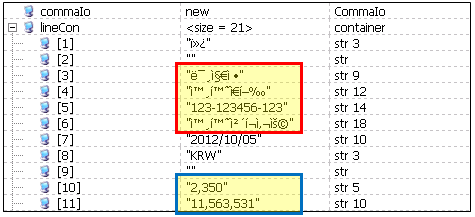
The screenshot below shows how each class read the line.

CommaTextIo correctly read Unicode text and amount with thousand separator

CommaIo correctly read the amount with thousand separator but not the Unicode text

TextIo correctly read Unicode text but not the amount with thousand separator (The amount supposed to be 2350 not 2 and 350)

AsciiIo incorrectly read both Unicode text and amount with thousand separator

Below is a sample code used to read the CSV file, the screenshots above are captured by running the job below for each of the class mentioned (CommaTextIo, CommaIo, TextIo, & AsciiIo).

static void TestReadCSV(Args _args)
{
    #File
    #define.comma(',')
    CommaTextIo        commaTextIo;
    container          lineCon;
    ;
    
    commaTextIo = new CommaTextIO(@'C:\UnicodeSample.csv', #io_read);
    commaTextIo.inFieldDelimiter(#comma);
    commaTextIo.inRecordDelimiter(#delimiterCRLF);
    
    lineCon = commaTextIo.read();
    
    while(lineCon && (commaTextIo.status() == IO_Status::Ok))
    {
        info(conPeek(lineCon, 4));
        
        lineCon = commaTextIo.read();
    }
}

Monday, 5 November 2012

Invalid use of the DataAreaId field in a cross-company query

Did a search online and doesn't find much info about this error - "Invalid use of the DataAreaId field in a cross-company query", it might be worth to share what has been found and the workaround.

During the development today, I hit this error, not sure why it doesn't allow the use of DataAreaId in the query criteria on crossCompany query, but there's a quick workaround for this - join it to DataArea table.


The query above had a compile error at 'tableA.dataAreaId' with an error message of "Invalid use of the DataAreaId field in a cross-company query". To workaround this error, joining it to DataArea table would fix it.

Instead of explaining in plain text, it is easier to understand by seeing the code and result.
Below are the sample data and the query to help further elaborate it.

TABLEA
DATAAREAID FIELD1     FIELD2     FIELD3     FIELD4
---------- ---------- ---------- ---------- ----------
ceu        CEU_R1_F1  CEU_R1_F2  CEU_R1_F3  CEU_R1_F4
ceu        CEU_R2_F1  CEU_R2_F2  CEU_R2_F3  CEU_R2_F4
con        CON_R1_F1  CON_R1_F2  CON_R1_F3  CON_R1_F4
con        CON_R2_F1  CON_R2_F2  CON_R2_F3  CON_R2_F4
dat        DAT_R1_F1  DAT_R1_F2  DAT_R1_F3  DAT_R1_F4
dat        DAT_R2_F1  DAT_R2_F2  DAT_R2_F3  DAT_R2_F4

TABLEB
DATAAREAID FIELD1     FIELD2     FIELD3     FIELD4
---------- ---------- ---------- ---------- ----------
ceu        F1         F2         F3         F4
con        F1         F2         F3         F4
dat        F1         F2         F3         F4


Work around by joining to DataArea table
while select crossCompany tableA
        join dataArea
       where dataArea.id       == tableA.dataAreaId
        join tableB
       where tableB.dataAreaId == dataArea.id
{
    info(strFmt("%1 - %2 - %3", tableA.dataAreaId,
                                tableA.Field1,
                                tableB.dataAreaId));
}

ceu - CEU_R1_F1 - ceu
ceu - CEU_R2_F1 - ceu
con - CON_R1_F1 - con
con - CON_R2_F1 - con
dat - DAT_R1_F1 - dat
dat - DAT_R2_F1 - dat


Incorrect join
Although TableB has 1 record per company, but joining with crossCompany keyword will result in joining without DataAreaId and cause incorrect query result.

while select crossCompany tableA
        join tableB
{
    info(strFmt("%1 - %2 - %3", tableA.dataAreaId,
                                tableA.Field1,
                                tableB.dataAreaId));
}

ceu - CEU_R1_F1 - ceu
ceu - CEU_R2_F1 - ceu
con - CON_R1_F1 - ceu
con - CON_R2_F1 - ceu
dat - DAT_R1_F1 - ceu
dat - DAT_R2_F1 - ceu
ceu - CEU_R1_F1 - con
ceu - CEU_R2_F1 - con
con - CON_R1_F1 - con
con - CON_R2_F1 - con
dat - DAT_R1_F1 - con
dat - DAT_R2_F1 - con
ceu - CEU_R1_F1 - dat
ceu - CEU_R2_F1 - dat
con - CON_R1_F1 - dat
con - CON_R2_F1 - dat
dat - DAT_R1_F1 - dat
dat - DAT_R2_F1 - dat


Monday, 29 October 2012

Dynamics AX 4 report - Unable to load page

One of the very old question pop up again recently - the "Unable to load page" on AX4 report.
The last I know, it need a hotfix on the Dynamics AX client (AX32.exe).

I had a quick check on local instance with different client build (4.0.2501.116 and 4.0.2503.998), one has the error and the other doesn't.


  • App: 4.0.2501.116 with Client: 4.0.2501.116 => "Unable to load page" error on report
  • App: 4.0.2501.116 with Client: 4.0.2503.998 => No error on report


Wednesday, 24 October 2012

Import with ID values will retain ID from other layer


More details on layer & ID
http://msdn.microsoft.com/en-us/library/aa548140(v=ax.50).aspx
http://msdn.microsoft.com/en-us/library/aa881527(v=ax.50).aspx


Any object created in VAR layer usually has an ID range between 30001 - 40000.
Eg. 30001, 30002, 30003 ... etc.

This is true if the object is CREATED from that layer, but not if you created it by IMPORT with ID.

Let's say, you created a field in USR layer, export with ID, delete from USR layer, then import with ID into VAR layer. When the new field is imported into VAR layer with ID, it doesn't create a new ID, but it do as the option says - Import the ID, so, you'll get USR ID in VAR layer.

Eg (screenshots below):

  1. A new field 'ReadyToPost' is created in USR layer at CustInvoiceTable
  2. Export the table, then delete if from USR layer
  3. Login to VAR layer and import with ID
  4. You'll then see the new field 'ReadyToPost' created in VAR layer, but having USR layer ID.

Option - Import with ID
USR layer ID retained - 50002


Dynamics AX services login & SQL access/security risk

Dynamics AX AOS service login require only a few access and this would prevent developer doing some funny thing around the database. But sometimes when DBA doesn't give a throughout thought on it, it might cause security issue.

Eg.
DBA is requested to look at an AOS start up issue, rather than checking and fixing it properly, a sysadmin role is granted to the AOS service login as a quick fix. Sometimes under urgency or pressure, this might be a quick fix, but it would cause security risk issue. Although this role is granted only to the AOS service login, but developer with AOT access can issue a direct SQL statement to grant themselves the sysadmin role now.

Running the job below would grant the sysadmin role.

static void UpdateSQL(Args _args)
{
    str                             sql;
    Connection                      connection = new Connection();
    SqlStatementExecutePermission   sqlPerm;
    Statement                       statement;
    int                             rowsAffected;
    ;

    try
    {
        sql     = "EXEC master..sp_addsrvrolemember @loginame = N'Domain\\Username', @rolename = N'sysadmin'";
        sqlPerm = new SqlStatementExecutePermission(sql);
        sqlPerm.assert();

        statement    = connection.createStatement();

        rowsAffected = statement.executeUpdate(sql);

        CodeAccessPermission::revertAssert();
    }
    catch
    {
    }
}

Friday, 12 October 2012

Clone BitLocker partition on Windows 7 with Macrium Reflect

Received my SSD this afternoon and cloned the HDD partition over. It took few hours to complete the clone but it is well worth it, my old laptop feels like a new one now.

Before purchase the SSD, I've seen quite a number of post regarding the concern and issue on cloning BitLocker partition on Windows 7. It seems like a lot of people hitting error or unable to boot up after the cloning. I'm not getting into details about that, but just to share my experience on replacing my HDD with SSD.

I bought the Samsung SSD 830 256GB (SATA III) from Amazon.co.uk, free shipping and arrived in just a few days time. The package has a SATA to USB adaptor, which is quite useful to me (I don't have a caddy for secondary HDD in my laptop). It also comes with Norton Ghost 15 full version, but I didn't use it. For simplicity reason, I used Macrium Reflect. Below are the steps taken.

*I'm using Windows 7 with BitLocker enabled for OS partition
  1. Boot up OS as usual, install Macrium Reflect
  2. Plug in the SSD to USB port (with the supplied SATA to USB cable)
  3. Run the Macrium Reflect software and clone the partitions from HDD to SSD
    Cloning all 3 partitions at one go:
    > the reserved partition (~180MB)
    > the recovery partition (~2GB)
    > the OS partition (the remaining of my drive size)
    *Just Google for the instructions or video in YouTube
  4. Let it run for few hours
  5. After the cloning is completed, shut down laptop
  6. Took out battery, swap the HDD with the new SSD, put the battery back in
  7. Boot up OS as usual
  8. Turn on BitLocker again
No issue during the whole process, it all gone well.


Tuesday, 9 October 2012

Trick to add included column in AX2009

Ref. and more details at: http://daxdilip.blogspot.com/2011/05/tip-how-to-avoid-overriding-of-sql.html

In brief, included column is not supported in AX2009, but is now supported in AX2012.
To work around that in AX2009, it is to write the included column SQL statement and fire it up at the end of the AX synchronization (\Classes\Application\dbSynchronize).

You'll need to put some thought on the pro and cons before implement it, a proper control procedure should be put in place due to other developer from your project team might not aware of this extra SQL script.

Pro:
- Included column available in AX2009

Cons:
- Maintenance of the index
- Overhead during synchronization (index will first be dropped then recreated)

*Note
- New index created outside of AX (directly into the table in SQL) will be dropped during synchronization
- Included column added directly from SQL into existing AX table's index will be dropped only if you made changes to that index in AX AOT node

Alternatively, Advanced Storage Management seems to offer this feature, I've never try it before, but thought just mention it here for anyone who looking for options.
URL: http://www.aximprove.co.uk/product_AdvancedStorageManagement.html

Monday, 1 October 2012

try...catch... block not executed in transaction pair (ttsbegin/ttscommit)

One of the common habit to start developing on class that extends RunBaseBatch is by duplicating the Tutorial_RunBaseBatch class. The run method has a ttsbegin & ttscommit, developer usually put codes within that section, this normally works OK. But sometimes when this class is calling a lot of other class to do some job and that class has a well developed error handling, this outer ttsbegin & ttscommit might break it.

One of the case I seen recently is the use of SalesFormLetter.
The SalesFormLetter class has its own error handling, if it hit an error for current record (Eg. Sales order), it will handle the error and then move on with the next record. But this error handling is broken by another batch job development (a pair of outer ttsbegin & ttscommit).

Below are the details:

  • Developer duplicate the Tutorial_RunBaseBatch class
  • Modify it for a batch job development by putting them in .update() method and this method is wrapped by a pair of ttsbegin & ttscommit
  • This development perform some business logic and at the of of the process, calling SalesFormLetter class to do Picking list (Eg. Picking list of many different sales order)
  • A few orders processed, pick list printed
  • After several orders are posted, it reached an order that cause error
  • The error jump out to the inner most try...catch... block that's outside of the ttsbegin & ttscommit, this cause the try...catch... block inside SalesFormLetter not catching it, hence, not moving on to next order and posting stopped
  • All previously posted picking list is rolled back
  • Warehouse guy try to pick the item but picking list not found in the system (due to rolled back)

This issue happen because any error occur within a ttsbegin & ttscommit pair will not be catch by the try...catch... block within the transaction pair, it will jump out to the inner most try...catch block outside of the transaction pair.

Refer to this link for more details: http://msdn.microsoft.com/en-us/library/aa893385(v=ax.50).aspx

Example below shows an error occur in SalesFormLetter will not be catch by its try...catch... block, instead, it will jump out to the try...catch... block at the .run() method.

//Code modified to make this easier to read, but should
//roughly explains what this article is trying to achieve

public void run()
{
    try
    {
        ttsbegin;
        this.update();
        ttscommit;
    }
    catch
    {
    }
}


public void update()
{
    SalesFormLetter salesFormLetter;
    ;

    //Eg. Some business logic for batch job
    this.someOtherMethod();
    this.someOtherLogic();

    //Eg. Post a few picking list at the end
    salesFormLetter = SalesFormLetter_PickingList::construct(true);
    salesFormLetter.proforma(false);
    salesFormLetter.printFormLetter(true);
salesFormLetter.updatePrinterSettingsFormLetter(..., ...);
    salesFormLetter.parmMarkedLines(true);
    salesFormLetter.parmPostBatchMode(true);
    salesFormLetter.parmInventLocationMarked(...);
    salesFormLetter.update(...);
}


When developing error handling, it is important to consider the other classes that will be called and investigate further whether it will break it or develop a mechanism to handle it properly.

Sunday, 30 September 2012

Query Active Directory without administration pack

If the server you logged-on to doesn't have the administration tool/snap-in for Active Directory, an alternative is to use the standard query window. But of course it won't be as convenient as the administration tool itself and the interface is quite limited.

Run this command: rundll32 dsquery,OpenQueryWindow


You can then try search the AD and find the info you need.

Eg.
You wanted to find all users belong a particular group but you're unsure of the group name, you just roughly remember the name. Here're what you can do:

  1. List out the group name in the domain
    (Run this at the command prompt: 
    NET GROUP /DOMAIN)
    *Reference: 
    http://www.petri.co.il/list_all_users_and_groups_in_domain.htm
  2. Find the group name you looking for
  3. Use the query window above to find that group
  4. Double click on the result and it will shows you the list of member in the group